
Designing for Culture
& Emerging Markets
Project at Glance
Duration:
11 weeks. November 2025 - Jan 2026
Software:
Figma
Key deliverables
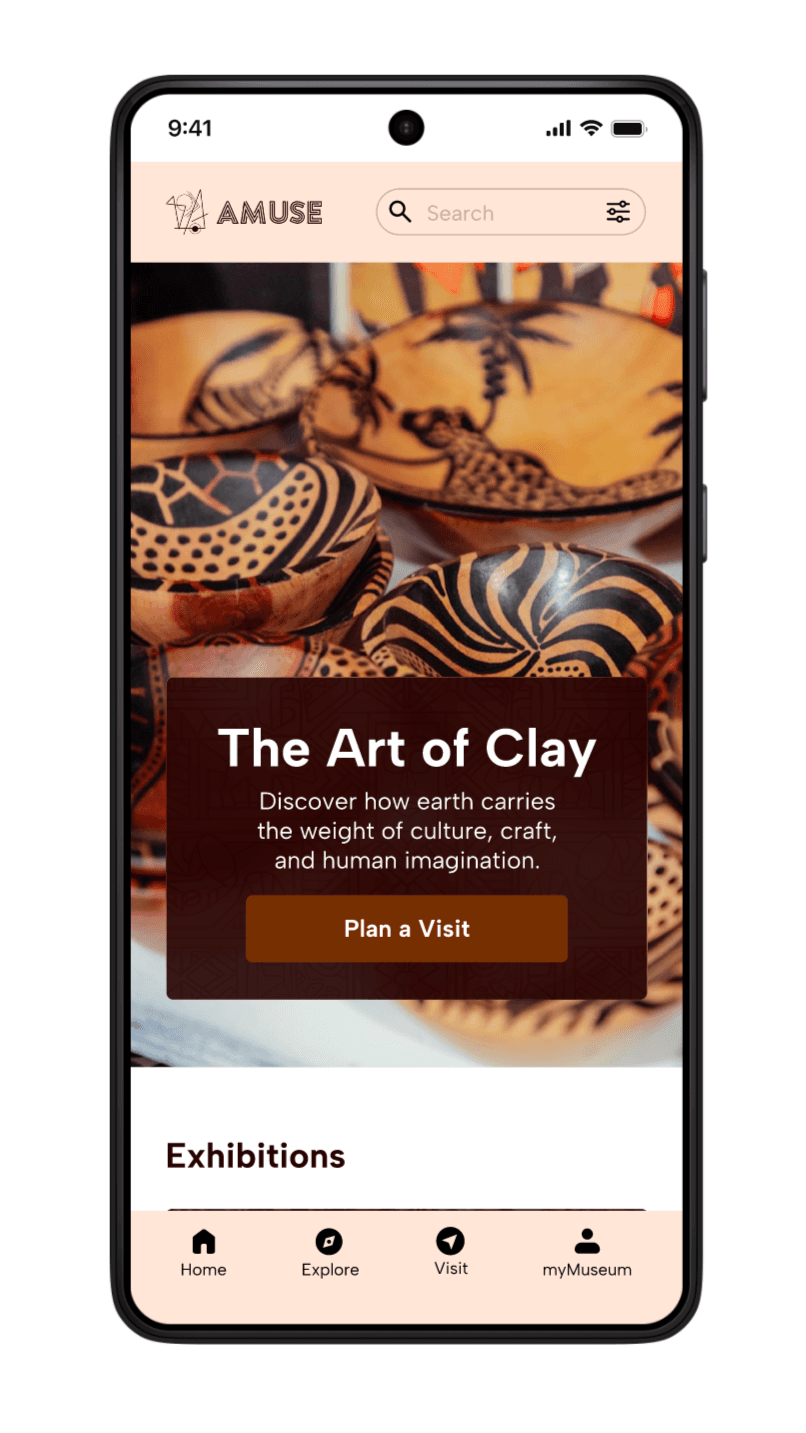
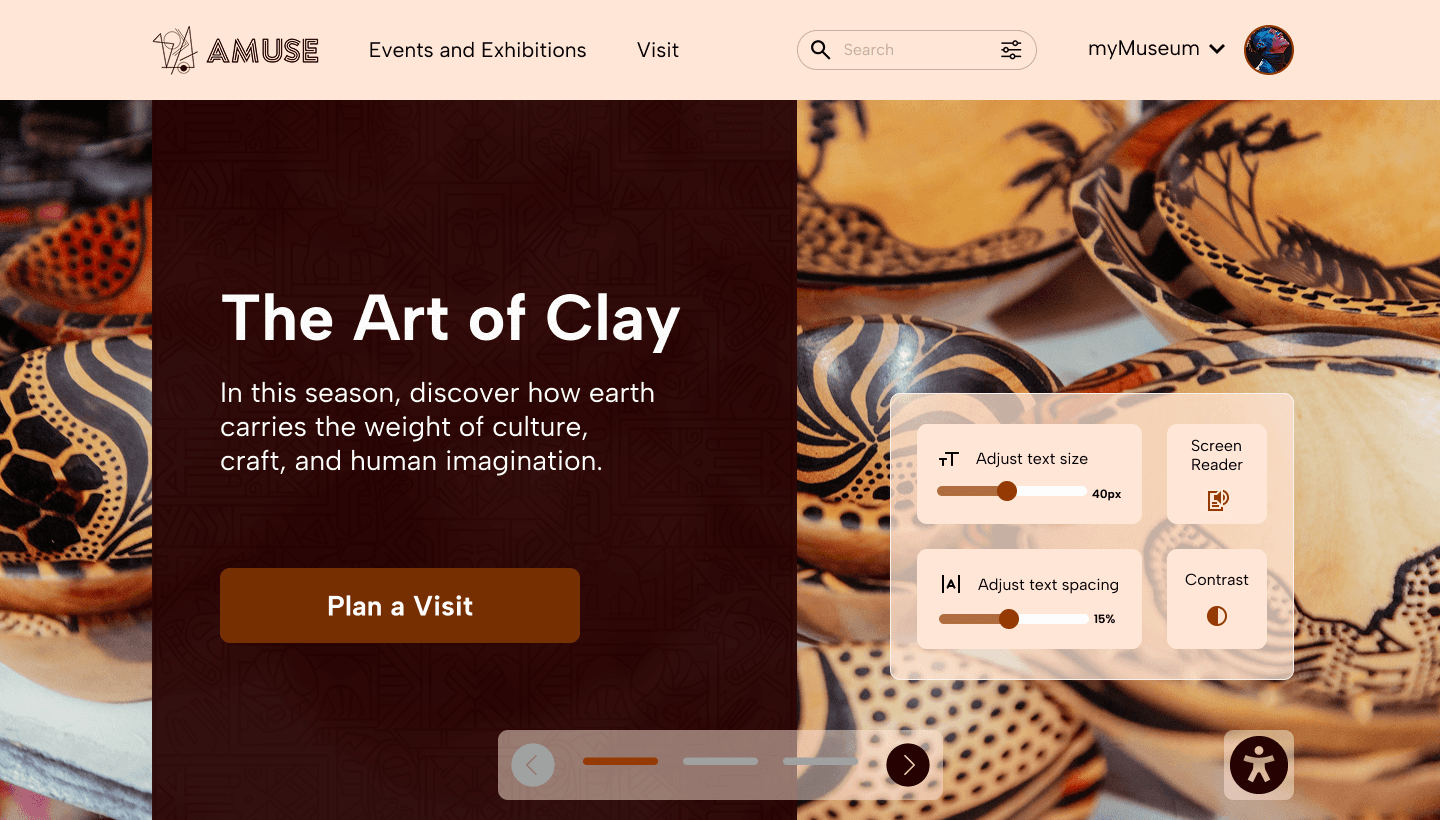
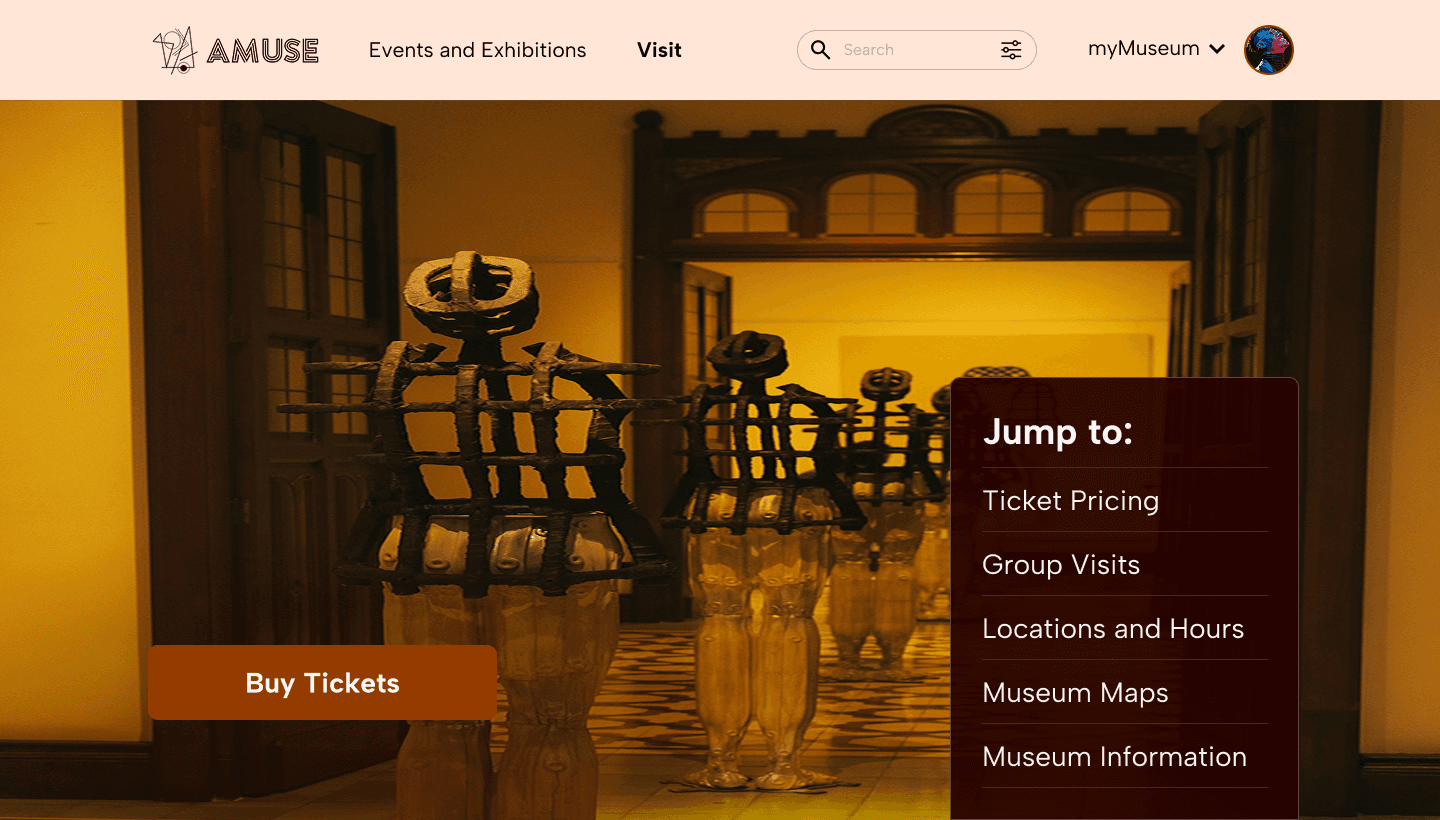
A responsive progressive web application (PWA) with interactive prototypes
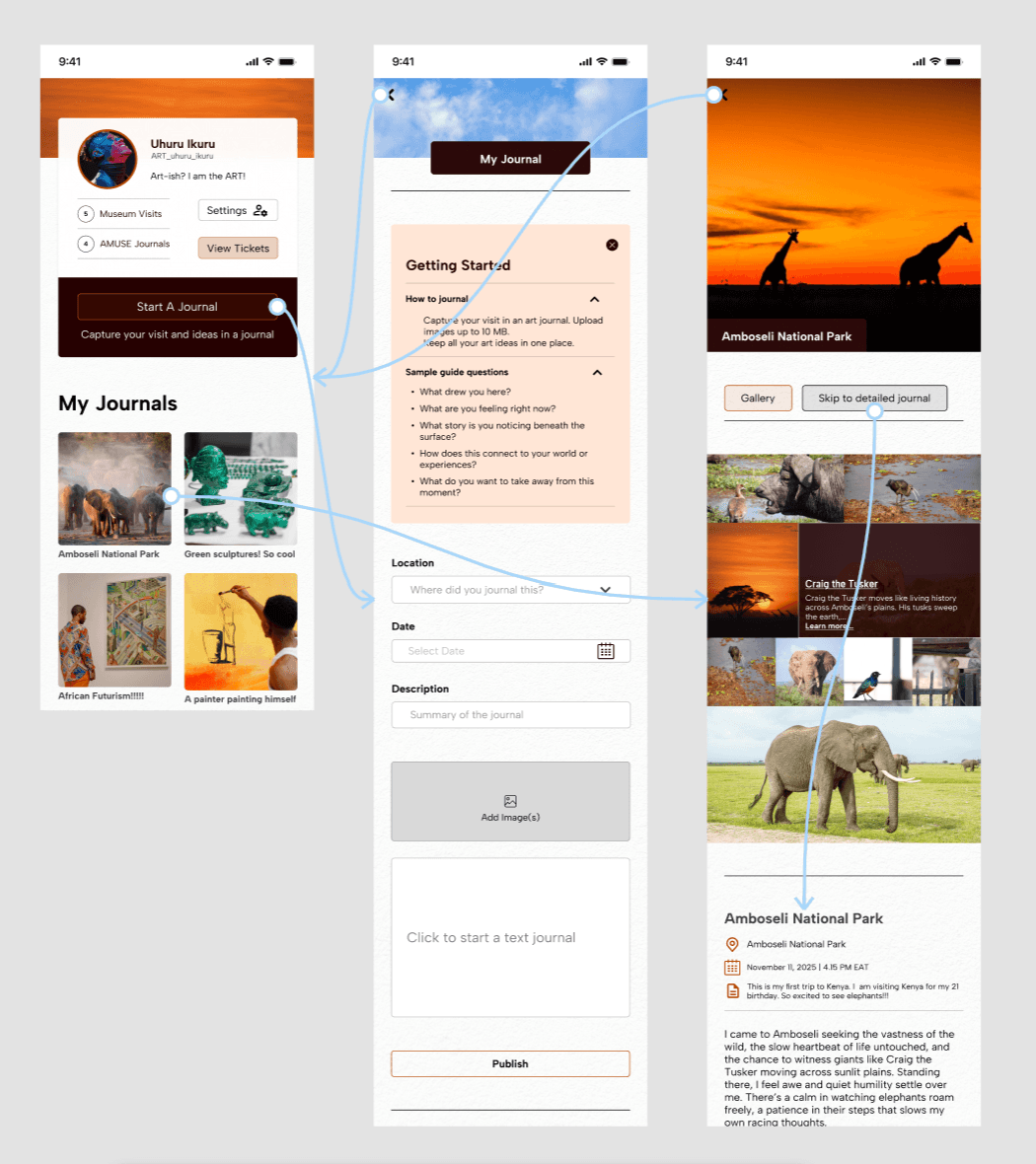
myMuseum, an art journaling feature
A design system with accessibility guidelines
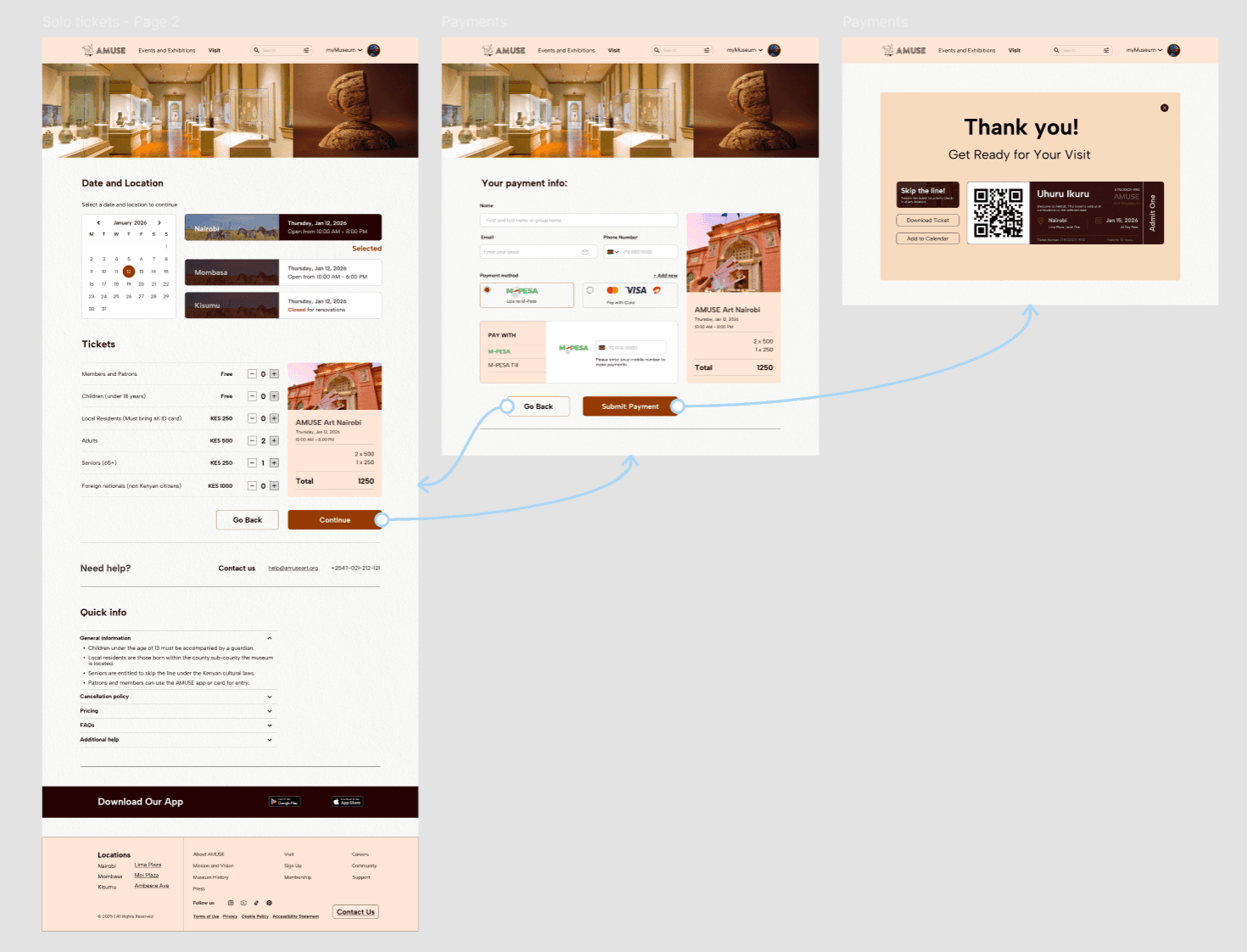
Fully integrated local payment options
Scalable multi-location content management system
User research findings and personas
10+
Distinct user journeys with deep links
5+
Ticketing tiers, including membership for visitors
03
Locations of content management
Building for both user experience (UX)
and client experience (CX)
The Problem
For Users:
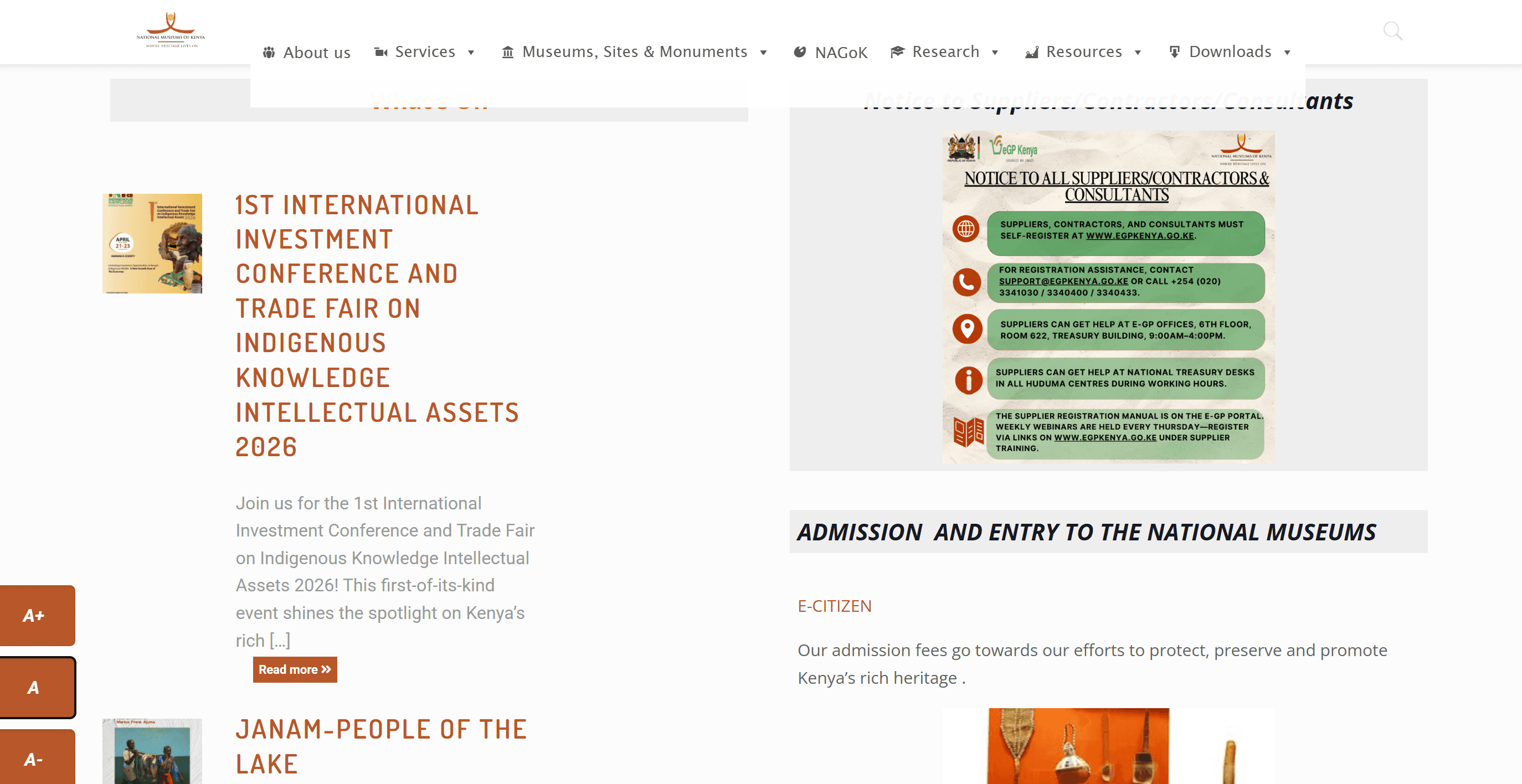
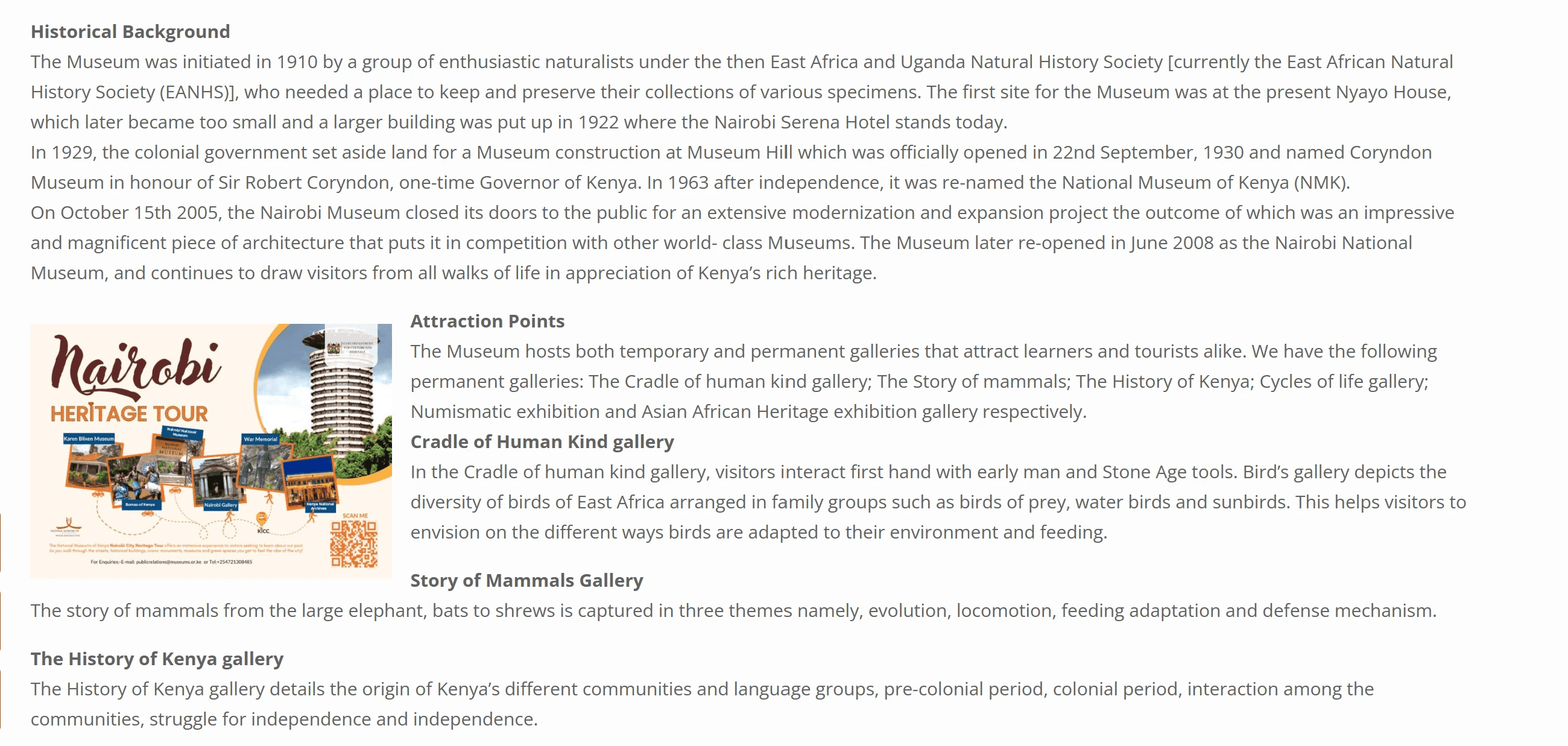
Most Kenyan museum websites are outdated, unresponsive on mobile, and fragmented, separating exhibitions, discovery, and have limited visitor information. As contemporary art, culture, and tourism grow, visitors need a modern, intuitive platform with seamless ticketing is needed for discovering events and exhibitions.
The Client:
AMUSE Art Museum wants an efficient museum visitor and content management system that handle frequent exhibition updates at multiple locations.
The Goal
For Users:
Develop an intuitive, modern public art museum platform that works seamlessly across devices. It simplifies online ticketing and event scheduling while showcasing contemporary art and events, creating a unified and engaging experience for all users.
The Client:
Build a scalable content management system that enables AMUSE staff to efficiently update exhibitions and events across multiple locations in real-time, and simplifies museum visitor management.
My Role
This individual project allowed me to apply design thinking across all stages of product design, while deepening my knowledge in both web and mobile app design.
Responsibilities
Conduct research
Built empathy maps, user personas, user stories, and maps to guide design decisions.
Define the user problem and develop problem statements
Visual design of lo-fi and hi-fi wireframes, prototypes, and conducting user testing.
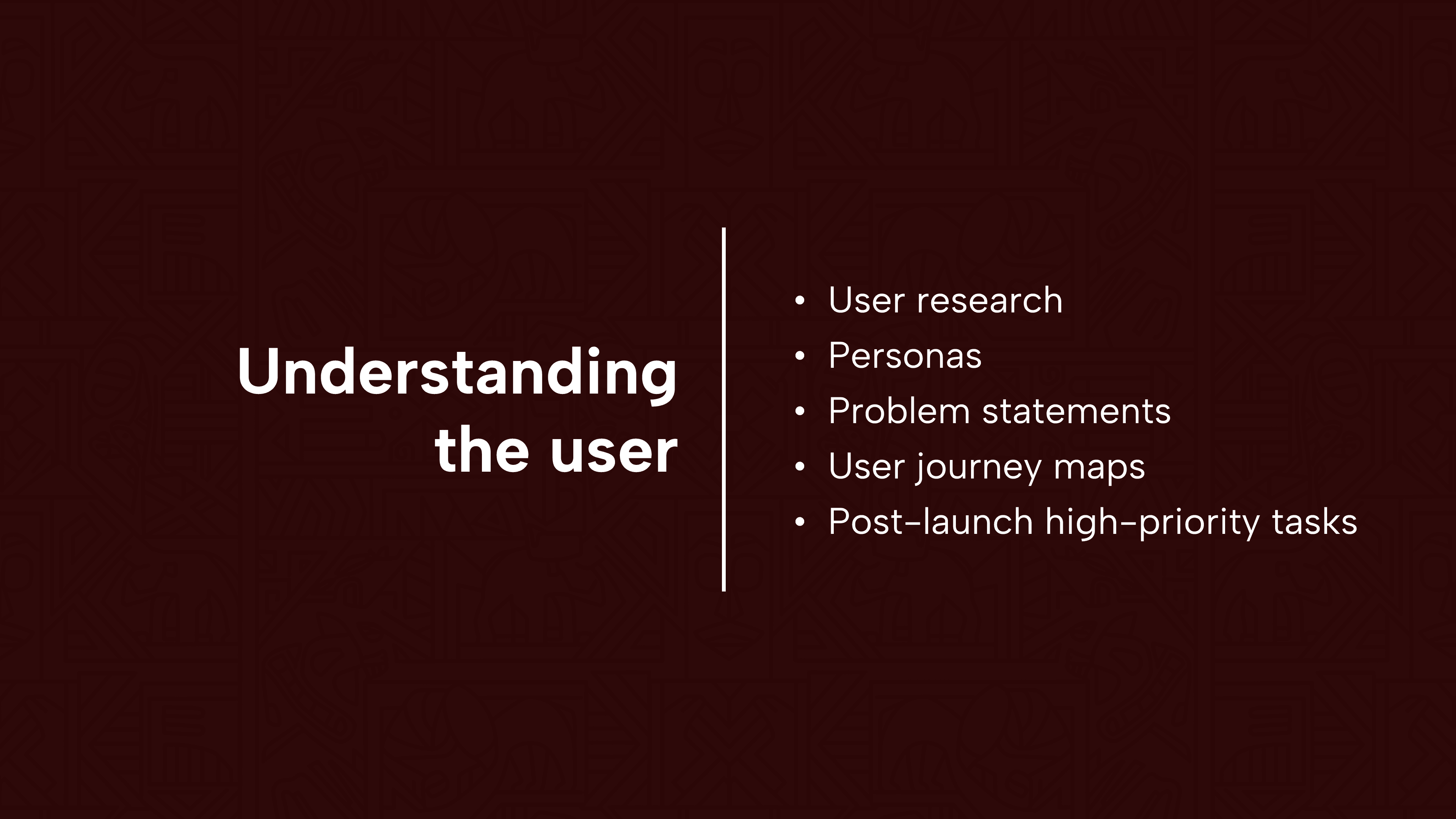
User Research Summary
To understand user needs, frustrations, and pain points, I conducted foundational user research focused on the museum booking and ticketing experience in Kenya.
The goal of the research was to understand how users discover museums, events, and exhibitions, and the challenges they encounter when booking tickets.
I primarily used qualitative user surveys and interviews to gather insights into user behaviors, expectations, and unmet needs. These findings informed the problem definition and guided early design decisions.
Findings
Incomplete Information Online
Users cannot find essential details like pricing, time slots, reviews, and accessibility information before booking.
No mobile money (M-Pesa) Booking
Though over 90% of Kenyans use M-Pesa, museums don’t offer it for online bookings, forcing users to buy tickets at the door and limiting convenience.
Mobile Unfriendly Websites
Museum sites are desktop-focused and often unresponsive across devices. Broken layouts, slow loading, and hard navigation lead to immediate abandonment.
The Discovery-to-Booking Disconnect
Users find museums via social media (TikTok, Instagram) but face friction during booking because of limited information.
Competitive Case Studies
Revisiting Design Problem
Design an app and a responsive website for a public art museum to advertise exhibitions and events, provide museum information to patrons, and enable patrons to schedule visits.
Findings
By 2024–2025, few competitive single-museum apps remain. The market has shifted toward multi-institution platforms and general cultural tourism apps such as Bloomberg Connect.
Dedicated museum apps see low adoption (<2%) and high early abandonment (77% within three days), making them largely unsustainable.
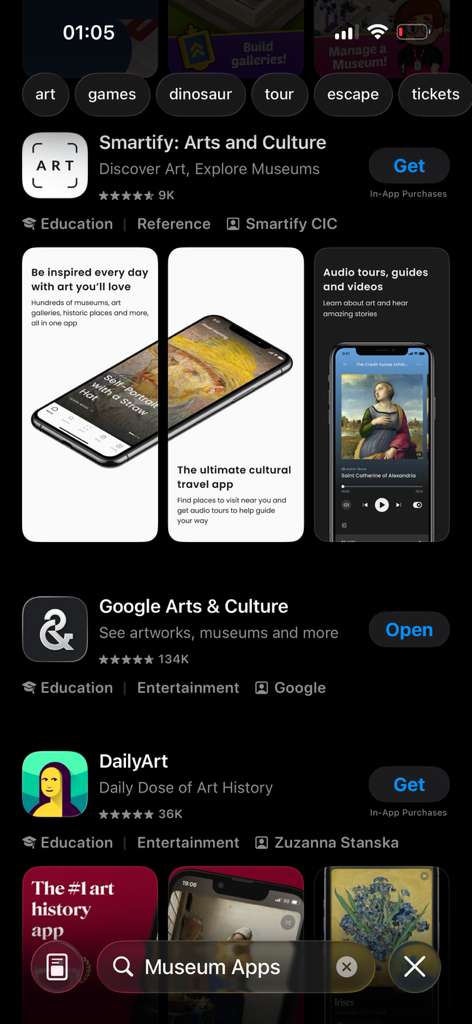
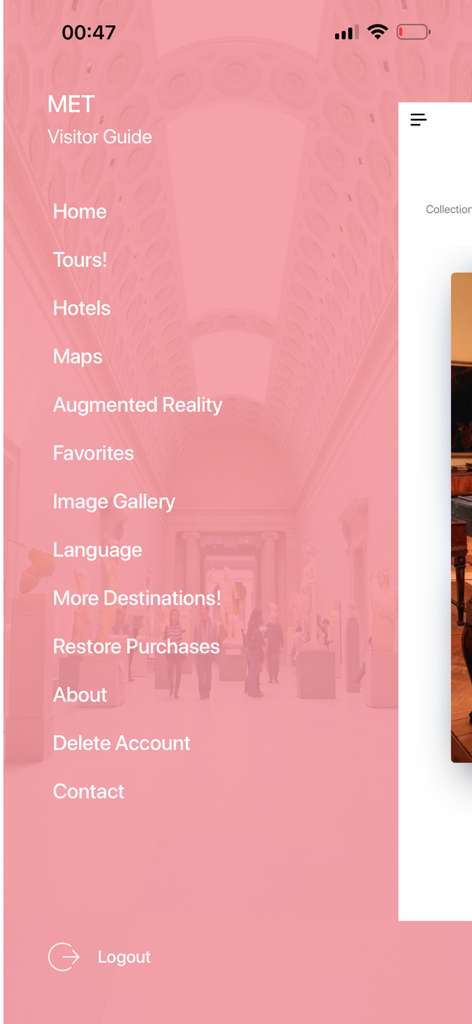
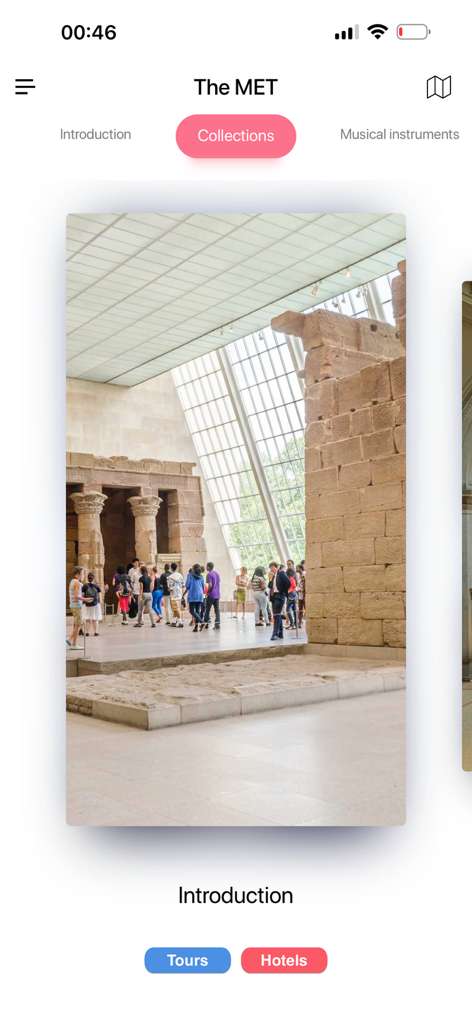
I researched the App Store and downloaded several museum apps. Most were under reviewed and showed low user adoption. Even apps from top tier institutions like The Met functioned primarily as redirect tools rather than standalone experiences.
“93% of female museum visitors carry smartphones, but fewer than 2% have any museum app installed.”
- Audio Cult
Persona
Problem Statement
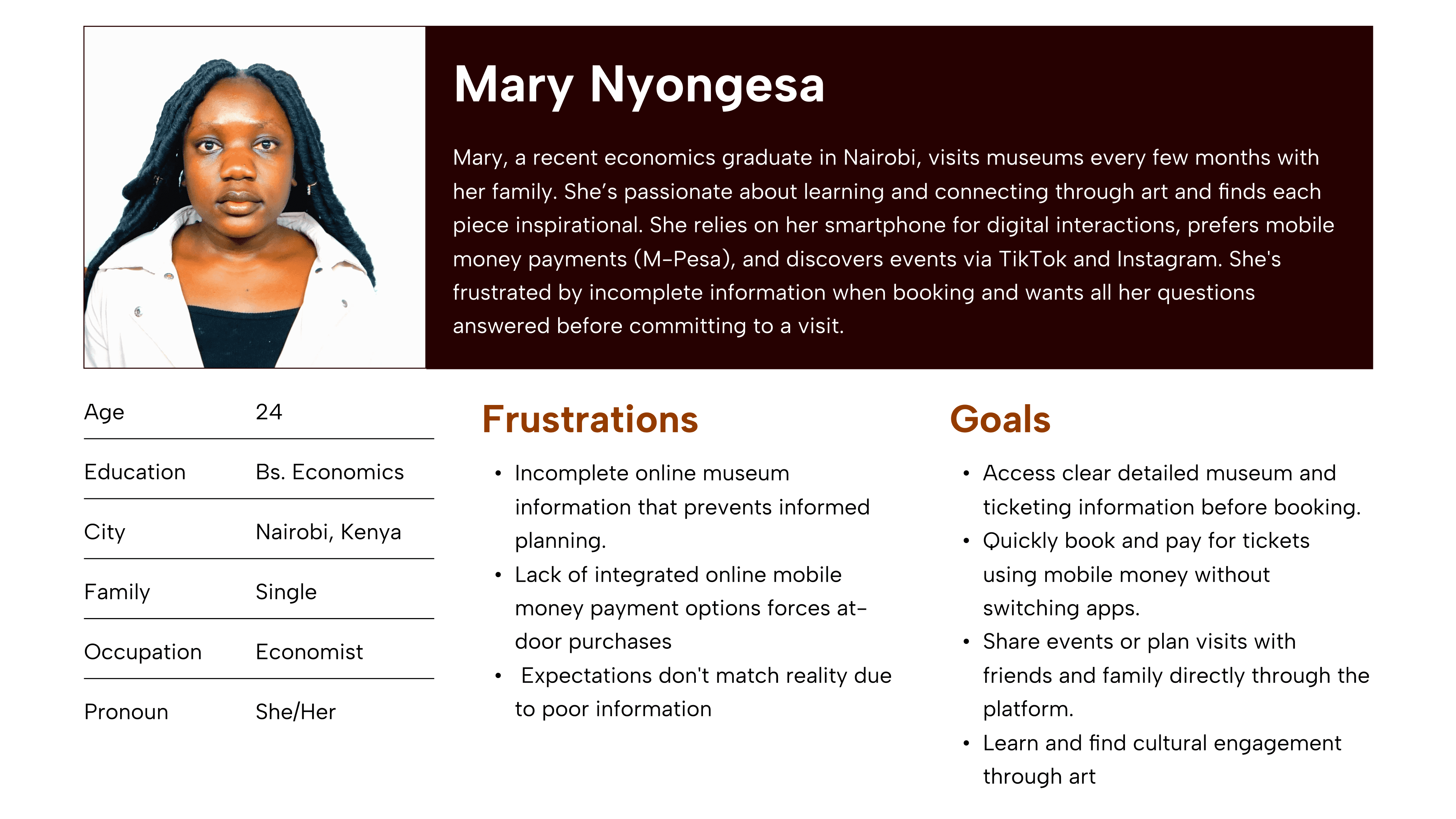
Mary, a young professional in Nairobi, needs an integrated mobile-first museum booking solution because limited exhibition details and no digital payments make planning visits difficult.
“It makes me feel inspired. I tend to remember how each piece of art is meant to carry a beautiful message.”
User Journey Maps
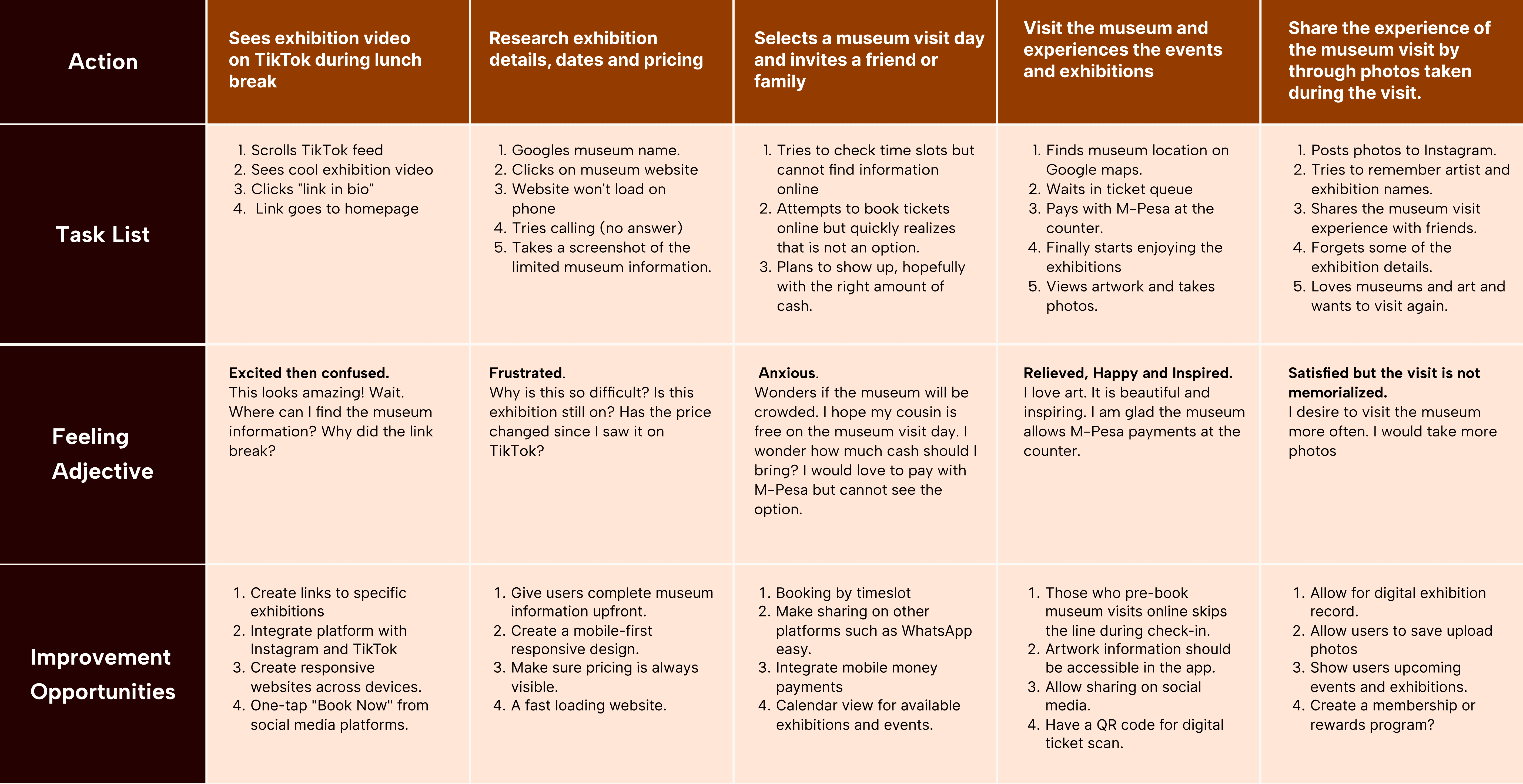
The user journey maps illustrate how Mary behaves, feels, and what they think while accomplishing their goals to address pain points or provide moments of delight.
Site Maps
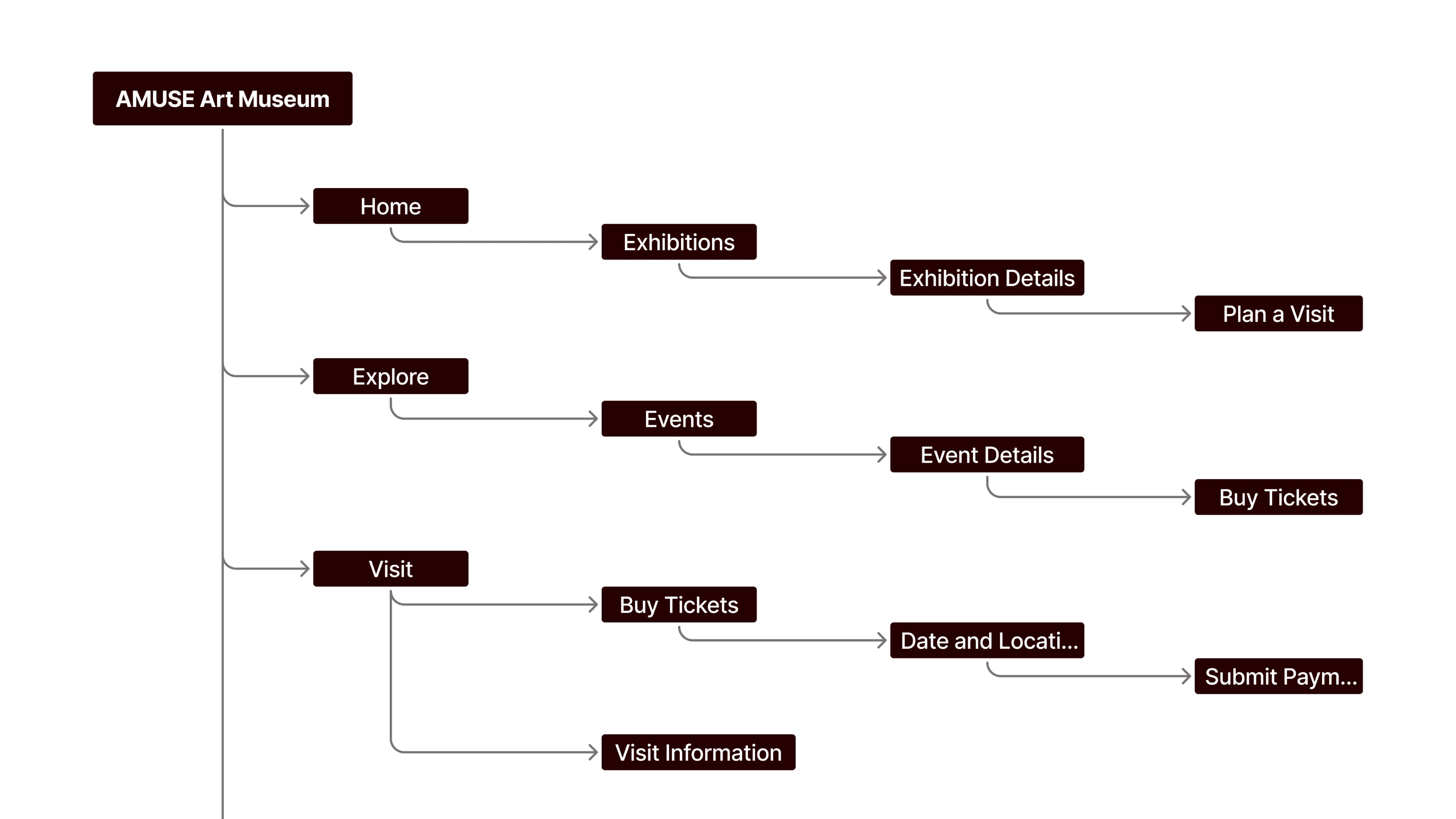
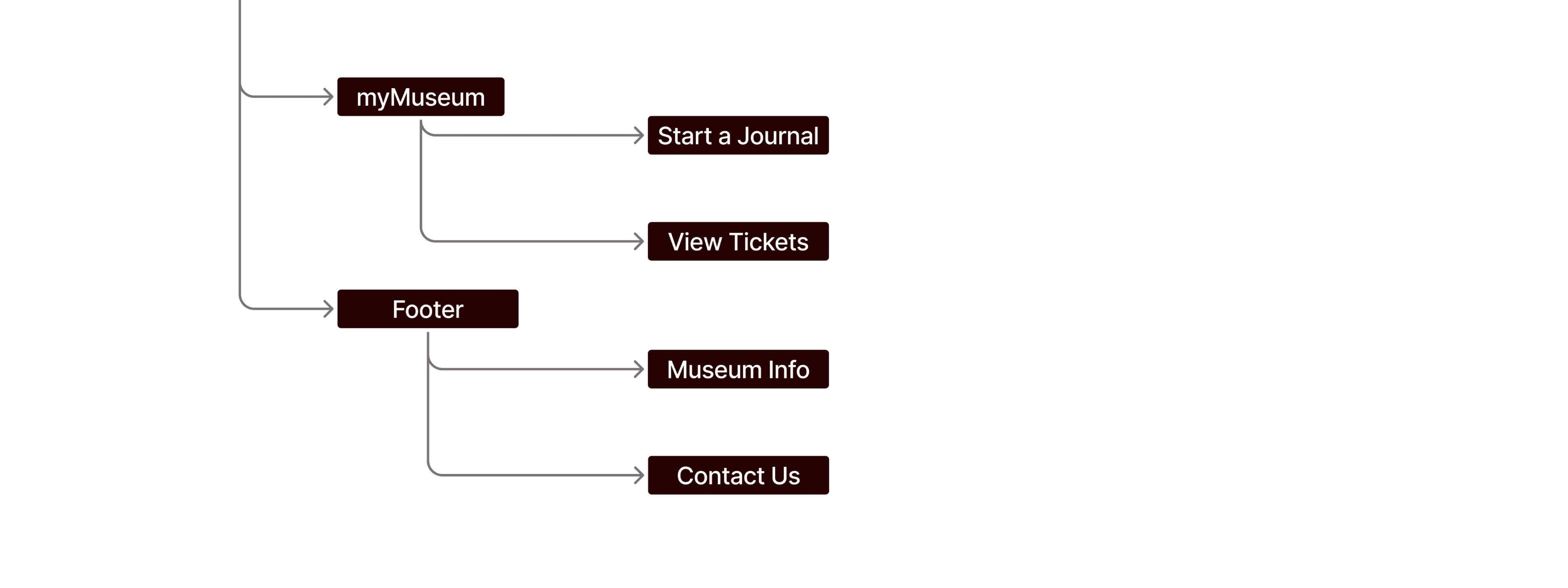
I designed user centered flows to enable my personas achieve their key goals while minimizing existing pain points.
Paper Wireframes
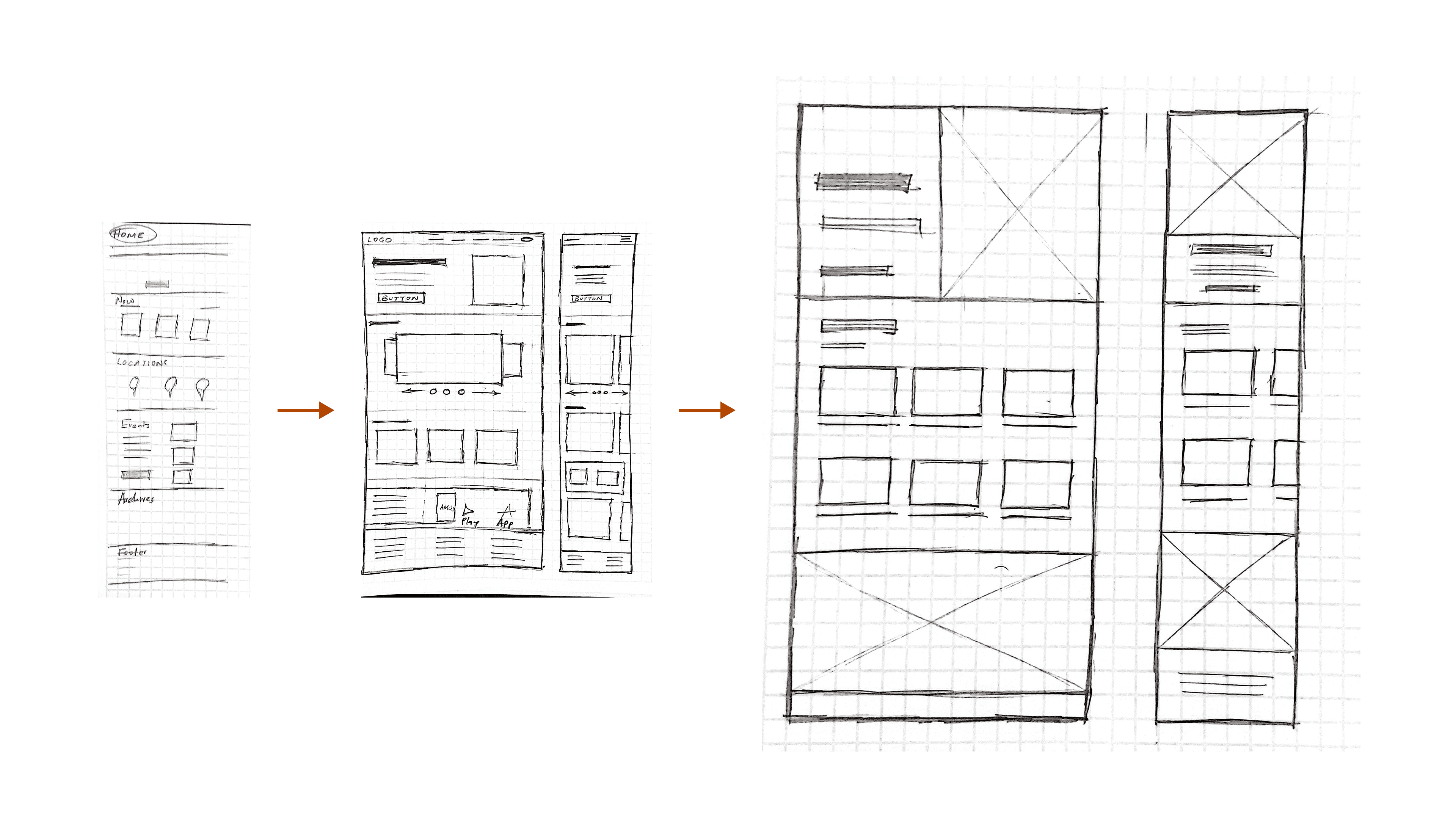
I started my design by sketching the screens on paper.
This helped capture ALL ideas fast, before selecting the best ideas.
I made sure that I sketched for mobile and desktop screens to ensure the final designs would be fully responsive.
Digital Wireframes Draft
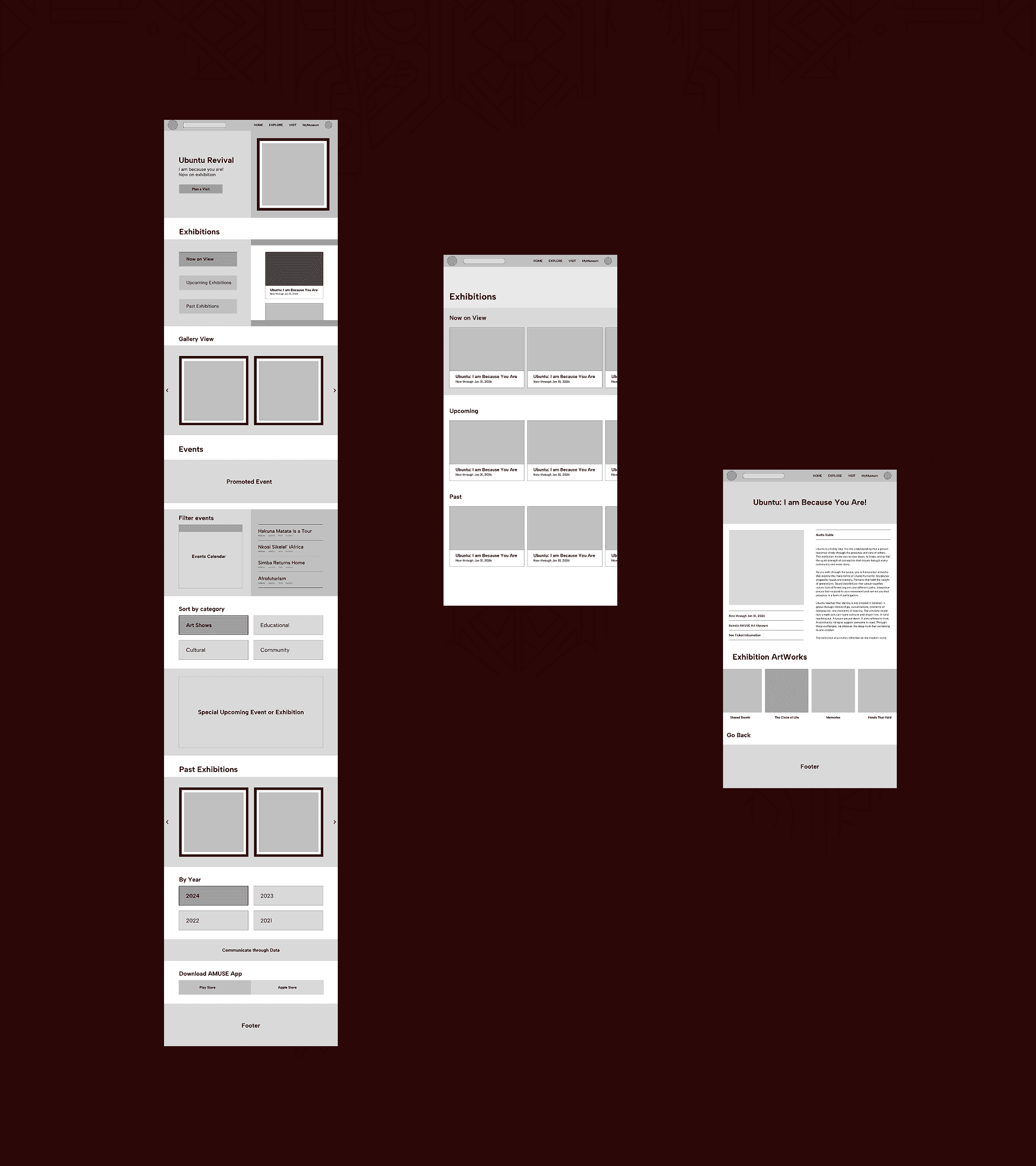
Because this project focused on a museum experience, my initial concept was a digital wall of art. I combined skeuomorphism and split-screen design to evoke a museum like atmosphere while allowing users to complete multiple tasks without switching screens.
However, I quickly found that skeuomorphism requires a lot of space, had major accessibility issues, and aged quickly, making it less future ready. Split-screen design increased cognitive load by forcing users to balance attention between two panels.
As a result, I pivoted. See the initial concept here.
Design Strategy
Revisiting the design problem surfaced key insights that directly informed my UI UX decisions.
First, most native museum apps are poorly adopted and lightly used. Even when available, they fail to provide enough value to become part of a user’s regular behavior.
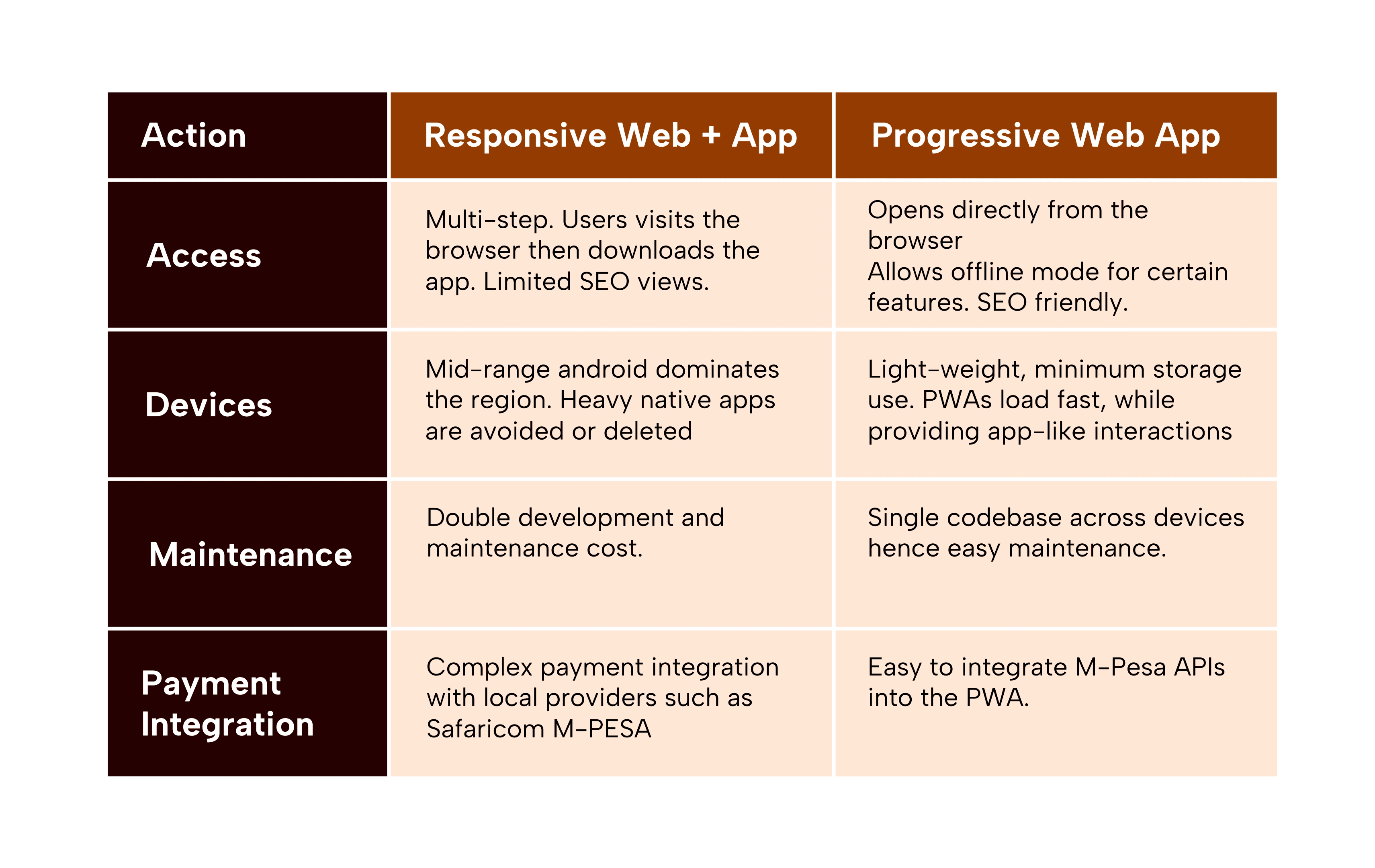
Second, this project targets an emerging market with real constraints. Kenya is a mobile first environment with inconsistent internet access, and most users rely on mid range Android devices. These conditions significantly influence performance expectations, interaction patterns, and feature prioritization.
As a result, the solution needed to work within existing technological, cultural, and economic realities while solving clear user pain points.
Revisiting the goal statement clarified the core problem: Mary needs a simple and reliable way to discover and book museum exhibitions online because current solutions are fragmented, unreliable, and lack essential information.
Revised Solution
A progressive web application (PWA) is the ideal design solution for the museum. It is fast, responsive, scalable, cost-efficient, and allows future community features
Digital Wireframes Final
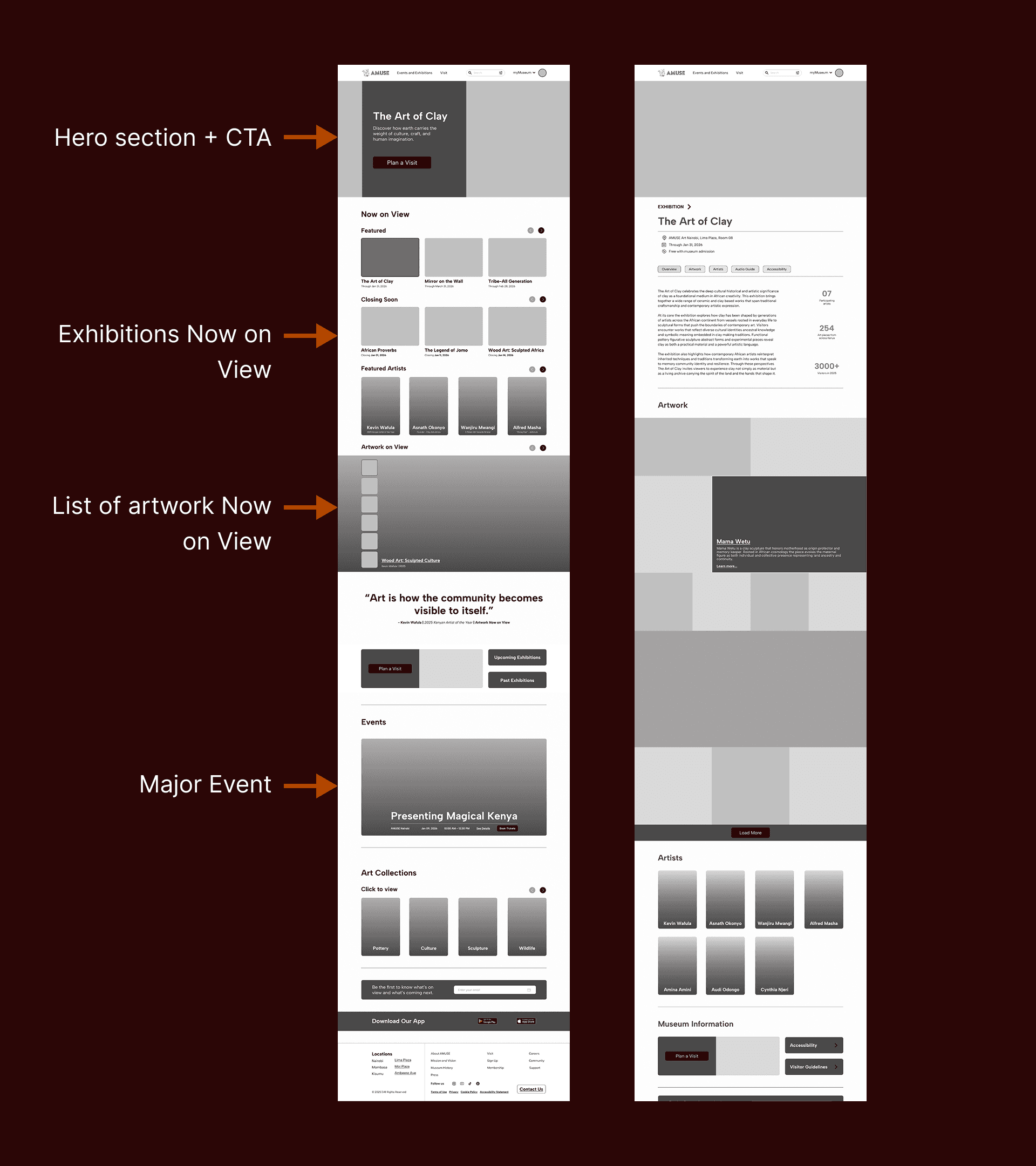
I designed the final wireframes in Figma, incorporating feedback from previous iterations.
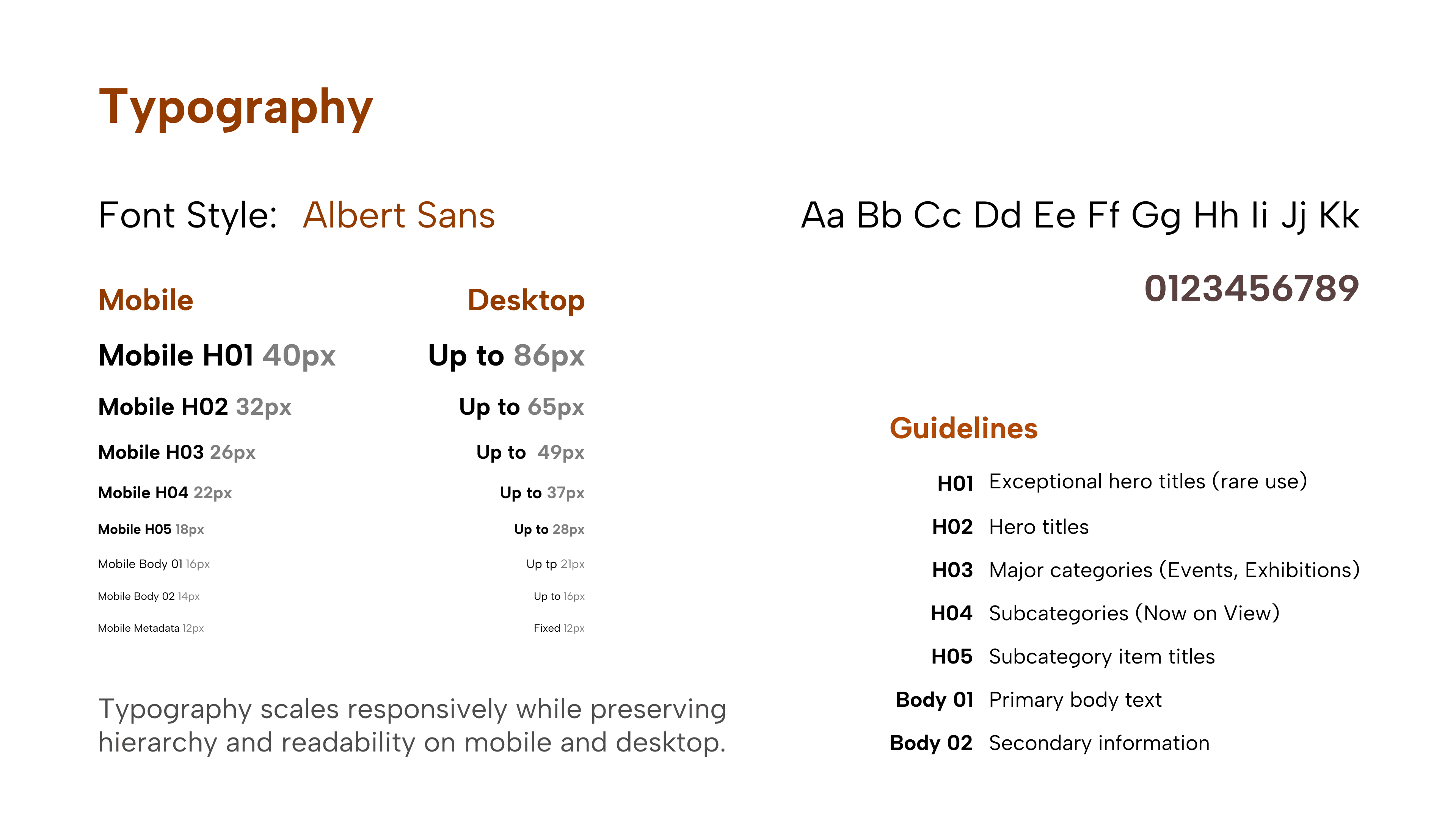
To ensure consistency and scalability, I established a design system early in the process, focusing on clear typography, generous spacing, reusable components, and a intuitive information architecture.
Usability Studies
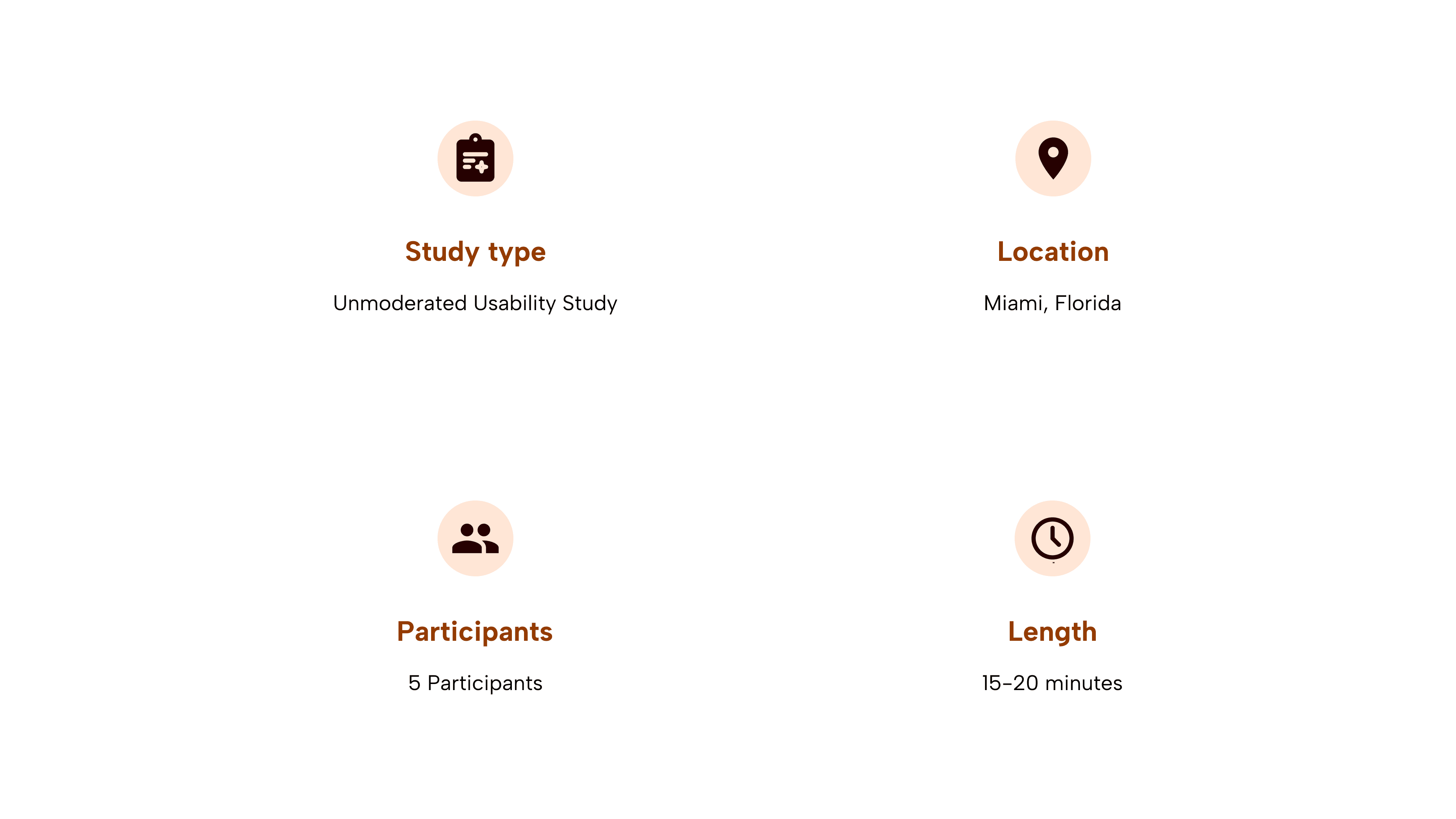
Usability Findings
Search Bar
Most users looked for a search bar to find events, exhibitions, and museum information.
I need to design a global search bar with quick filters to enable faster discovery.
Events Page on Mobile
Most users did not access the events page on mobile. The events link sit deep below the fold, requiring users to scroll past all exhibition categories.
I need to add a persistent navigation bar for quick access to key pages like events.
myMuseum Page
All users explored the myMuseum page unprompted, spent at least two minutes there, and tried to start a journal. They described it as "cool" and "amazing".
This new feature has been validated. I need to complete design for the full journaling experience.
Design Systems
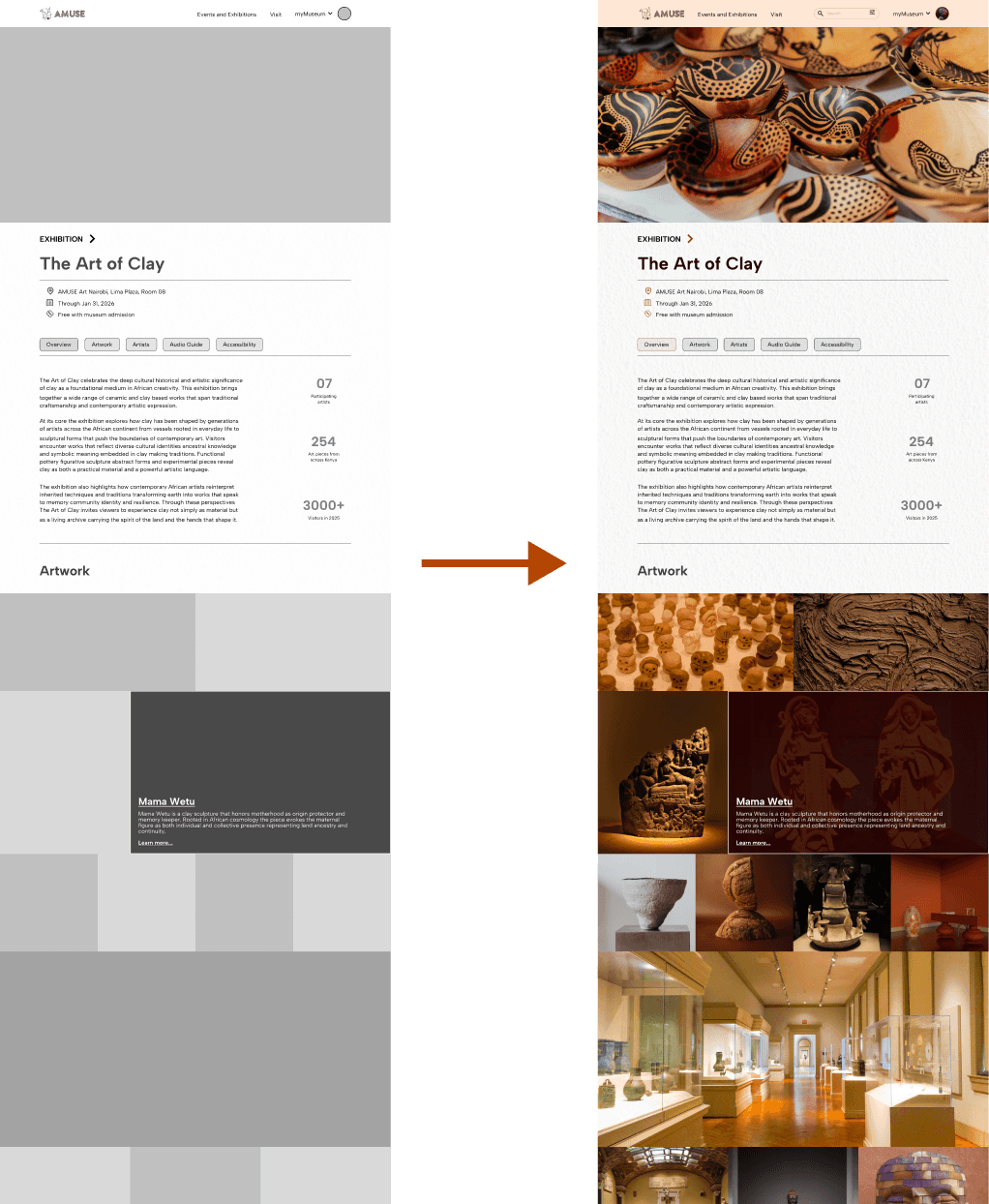
High Fidelity Mockups
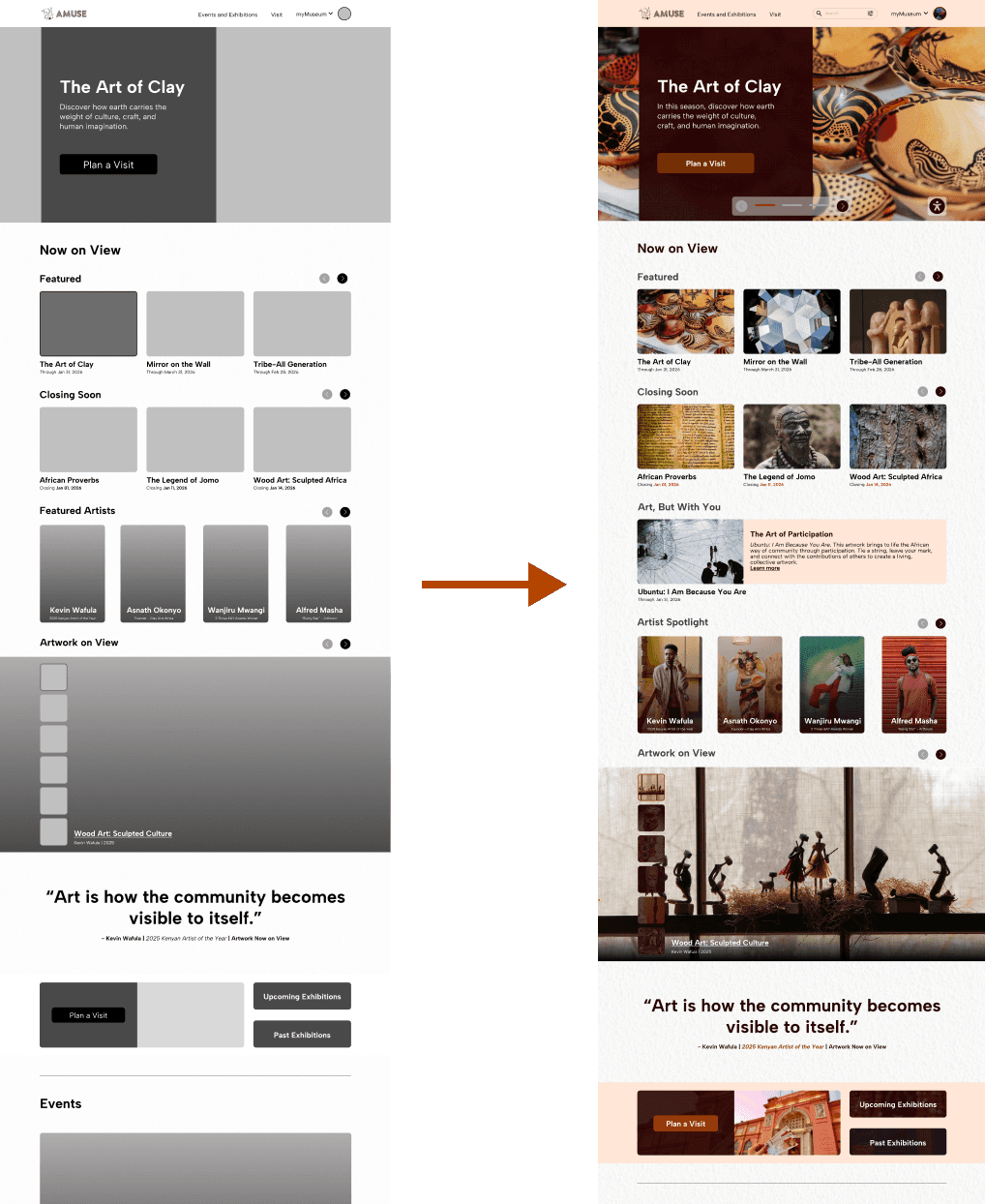
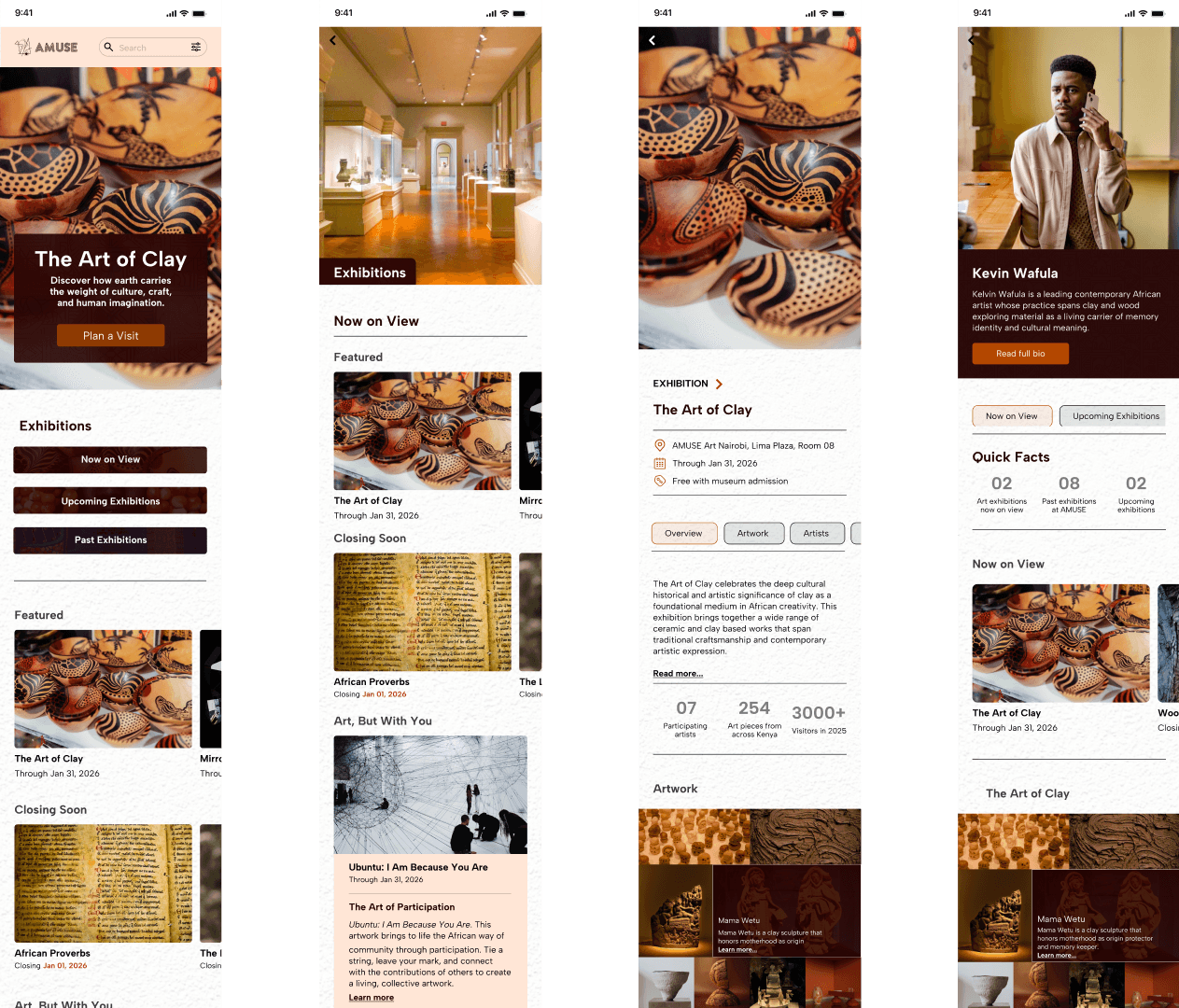
Based on insights from the usability study, I improved the design by adding a global search bar and completing the AMUSE journaling feature.
The positive response to journals inspired "Art, But With You" - a participatory art feature that extends creative expression from individual (journals) to communal experiences.
High Fidelity Prototypes
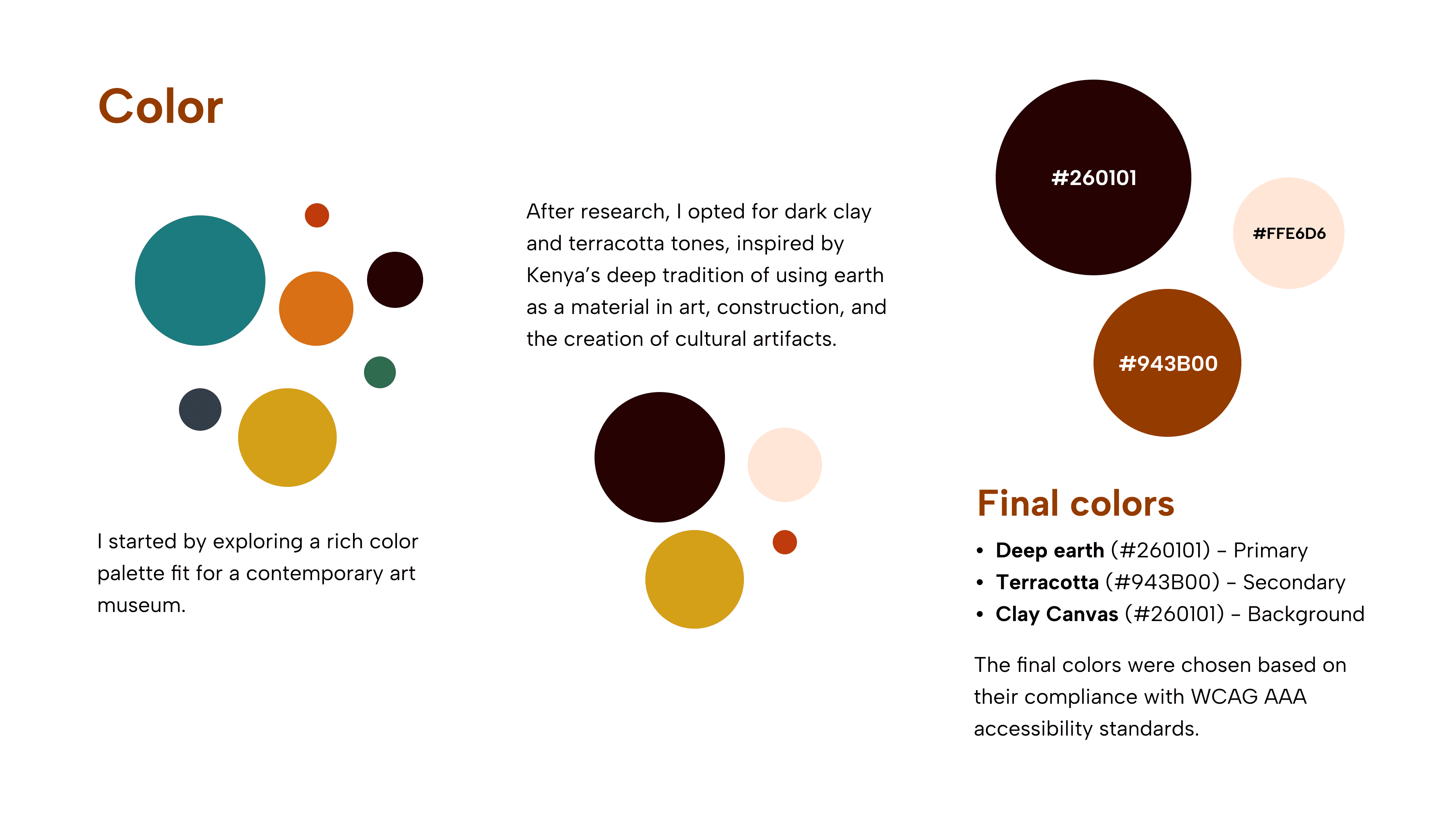
After the low fidelity prototype, I created the final responsive designs. I utilized my branding experience to design a consistent branding system for the museum project.
M-Pesa Integration
AMUSE Art Journals
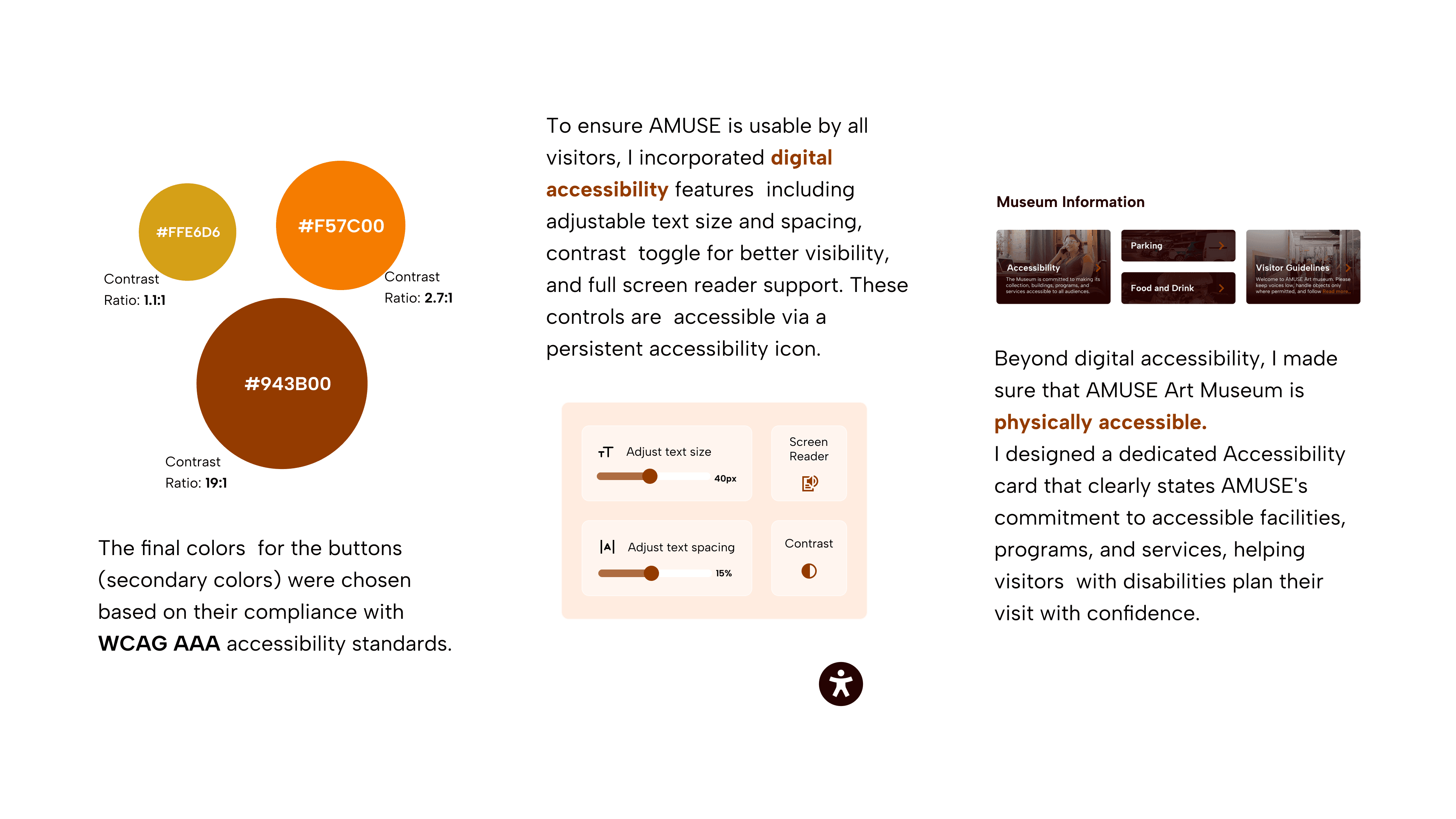
Accessibility Considerations
Post-Launch: Data-Driven Iteration
CTA Optimization
Current: "Plan a Visit" prioritizes visitor information but may create friction for informed visitors.
Test: "Plan a Visit" vs. "Buy Tickets" Measure: Completion rate by traffic source
Goal: Determine if contextual CTAs improve conversion while maintaining informed decision-making.
Art Journal Affordances
Usability tests validated strong interest in the journal feature. Post-launch, track adoption and completion rates to ensure enthusiasm translates to usage.
If engagement falls short, iterate on discoverability and flow simplification.
Mobile Version: Events
Track event bookings by entry point (Home vs. Explore). If a majority of bookings originate from Explore, rename to "Events" on mobile and restructure as primary event discovery page, aligning navigation with actual user behavior.
Key Takeaways
Impact
At the start of the project, my goal was to design for both user experience and client experience.
For users, I designed an intuitive platform that simplifies discovery and booking while solving core pain points; complete information, M-Pesa payments, and mobile-first design. The myMuseum journal feature deepens engagement by helping visitors capture and reflect on their experiences.
For the client, I designed a cost-effective PWA that works across devices, has low-cost maintenance through a single codebase, and scales efficiently across multiple locations.
<3 mins
Time it takes to book tickets. Reduced from hours to minutes
90%
Mobile money reach through M-Pesa integration.
Retention
Through art journaling
Lessons
Design is continuously iterative. Pivoting from the "digital wall of art" idea taught me to drop ideas that don't serve users, even after investing time in them.
User research is crucial. Integrating M-Pesa payments reminded me that user needs are contextual and localized, not universal.
Test more ideas and validate assumptions. The users’ enthusiasm for myMuseum feature proved that new ideas are worth experimenting through usability studies.
Next Steps
Feedback
Connect with senior designers on LinkedIn to critique and refine the design, particularly around mobile-first design for complex, emerging markets.
Code Interaction States
Use my front-end desvelopment (HTML, CSS, and JavaScript to design some of the interaction states.Utilize my front-end development skills in HTML, CSS, and JavaScript to design various interaction states.
Finish my LinkedIn article
I write on LinkedIn under KESHO, Embracing Futurism newsletter. This project inspired two KESHO newsletter editions exploring design's role in shaping meaning:
"Meaning and Purpose in the Age of AI and Automation" (published)
"Existential Product Design" (in progress)
Masachi DC Studios,
in association with Brandspot Media,
Category
Multimedia + Motion Design
Project
Multimedia & Motion Design
Masachi DC Studios,
in association with Brandspot Media,
presents an
epic comics story,
starring
Andrew Whiteman and
Anthony Fowler,
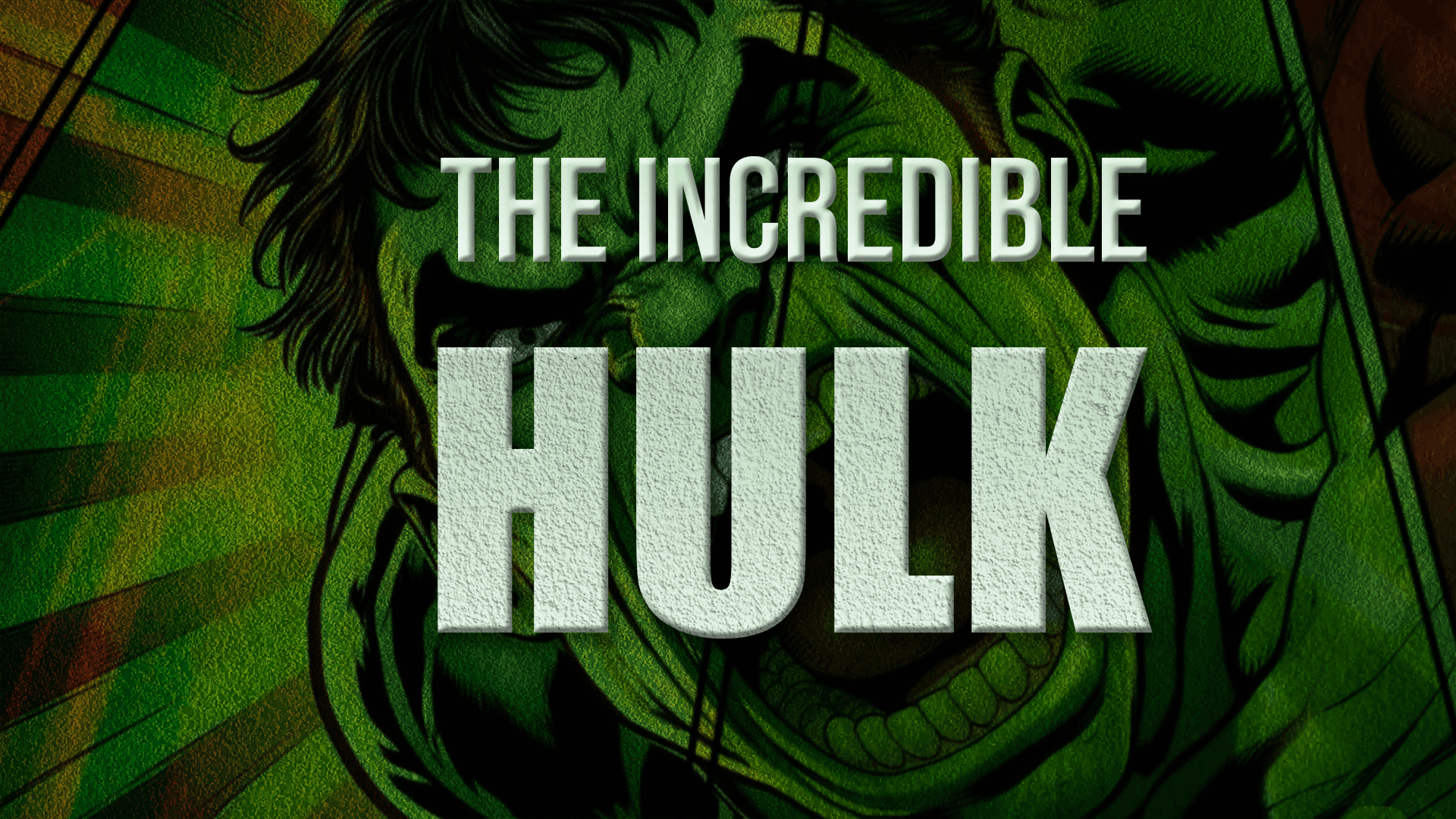
only on YouTube,
click to watch
Project at Glance
When:
Done from June 15 - July 30, 2025
Software:
After Effects, Premiere Pro, Photoshop
This project focused on building a strong foundation in motion design and After Effects. Leading up to the final piece, we studied the history of motion graphics and core principles such as timing, easing, hierarchy, rhythm, and visual continuity.
In parallel, we developed essential After Effects skills including kinetic typography, keyframe animation, motion curves, and particle physics.
Before beginning this project, I completed a series of smaller exercises to strengthen these skills and refine my workflow.
Below is a selection of process work of these project and more exploration projects.
Inside After Effects
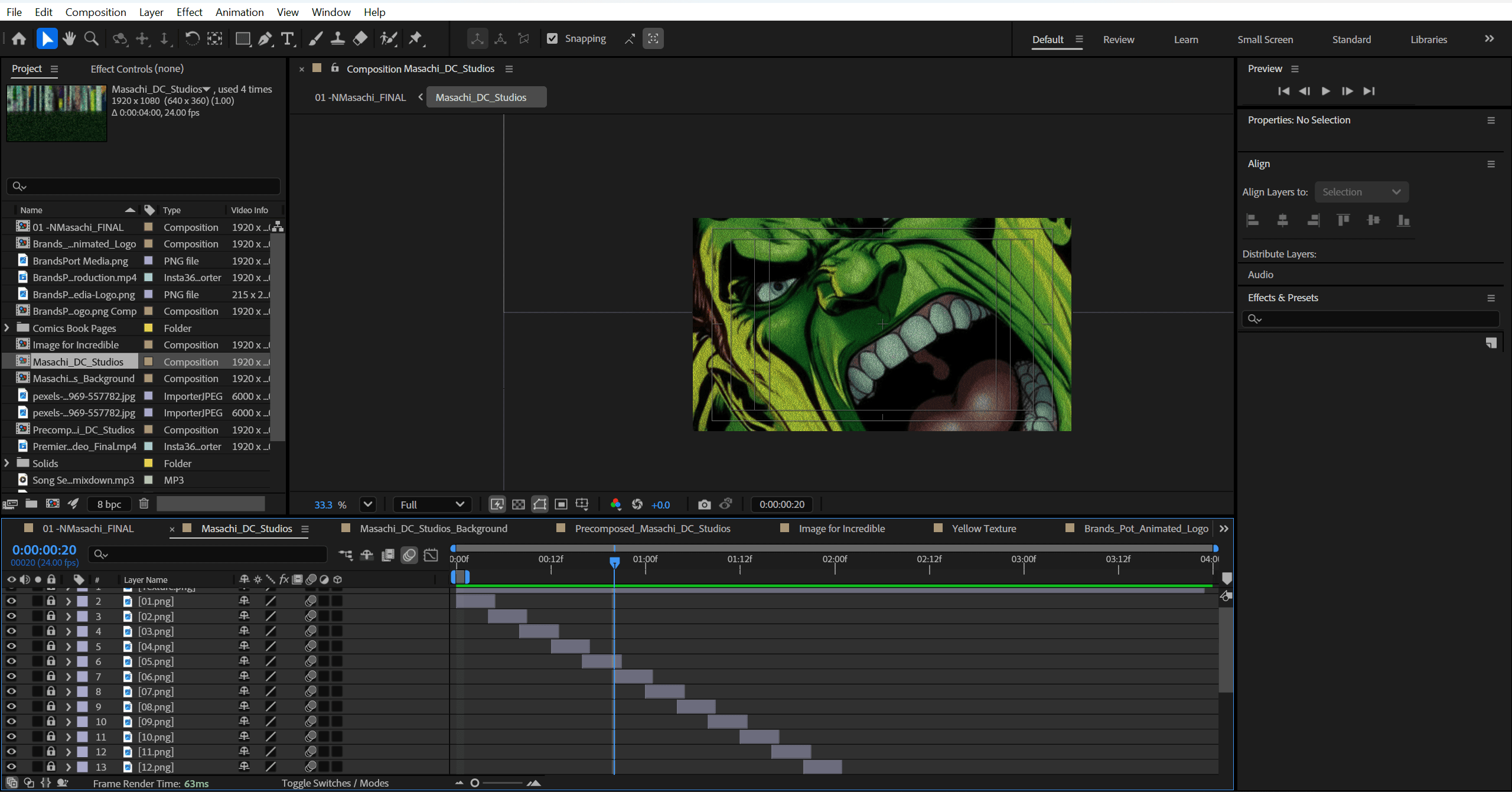
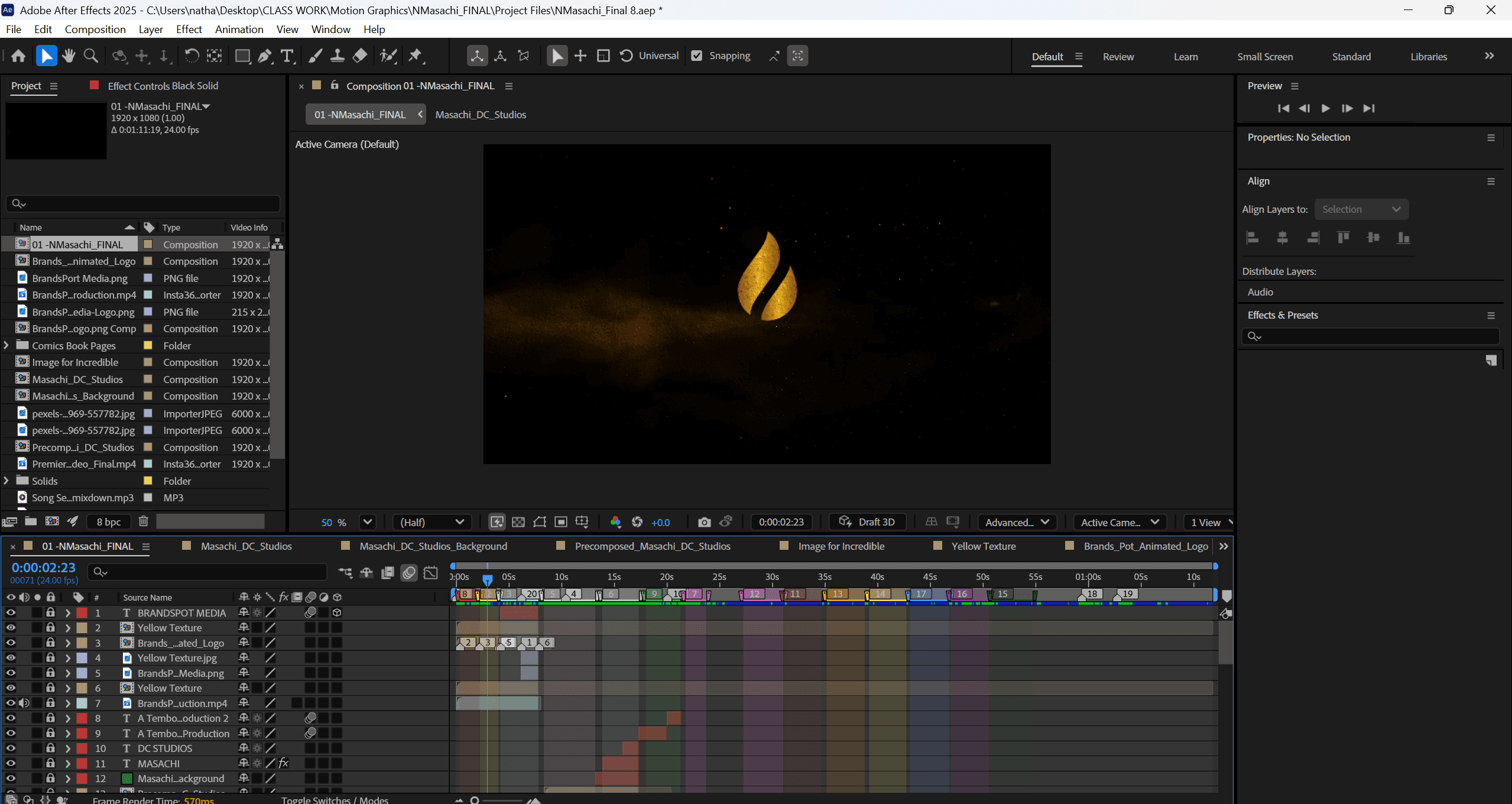

I started with a logo image and an AI generated video.
And now to some Breaking News
In Life and Style, the big question is,
Where would you rather visit for a month?
Where would you rather visit for a month?
Key Takeaways
After Effects is painfully manual. Building reusable presets early is essential for speed and consistency.
The interface is complex. I learned fastest by breaking it down through focused, interface or motion specific exercises.
Motion design can alter your perception (++). I now think instinctively in layers and motion. The skill transfers effectively.
Designing for Culture
& Emerging Markets
Designing for Culture
& Emerging Markets
Project at Glance
Duration:
November 2025 - Jan 2026
Software:
Figma
Key deliverables
Key deliverables
A responsive progressive web application (PWA) with interactive prototypes
myMuseum, an art journaling feature
A design system with accessibility guidelines
Fully integrated local payment options
Scalable multi-location content management system
User research findings and personas
10+
Distinct user journeys with deep links
90%
Population access enabled by M-Pesa mobile money integration
03
Locations of content management
Building for both user experience (UX)
and client experience (CX)
Building for both user experience (UX)
and client experience (CX)
The Problem
The Problem
For Users:
Most Kenyan museum websites are outdated, unresponsive on mobile, and fragmented, separating exhibitions, discovery, and have limited visitor information. As contemporary art, culture, and tourism grow, visitors need a modern, intuitive platform with seamless ticketing is needed for discovering events and exhibitions.
The Client:
AMUSE Art Museum wants an efficient museum visitor and content management system that handle frequent exhibition updates at multiple locations.
The Goal
The Goal
For Users:
Develop an intuitive, modern public art museum platform that works seamlessly across devices. It simplifies online ticketing and event scheduling while showcasing contemporary art and events, creating a unified and engaging experience for all users.
The Client:
Build a scalable content management system that enables AMUSE staff to efficiently update exhibitions and events across multiple locations in real-time, and simplifies museum visitor management.
My Role
My Role
This individual project allowed me to apply design thinking across all stages of product design, while deepening my knowledge in both web and mobile app design.
Responsibilities
Responsibilities
Conduct research
Built empathy maps, user personas, user stories, and maps to guide design decisions.
Define the user problem and develop problem statements
Visual design of lo-fi and hi-fi wireframes, prototypes, and conducting user testing.
User Research Summary
User Research Summary
To understand user needs, frustrations, and pain points, I conducted foundational user research focused on the museum booking and ticketing experience in Kenya.
The goal of the research was to understand how users discover museums, events, and exhibitions, and the challenges they encounter when booking tickets.
I primarily used qualitative user surveys and interviews to gather insights into user behaviors, expectations, and unmet needs. These findings informed the problem definition and guided early design decisions.
Findings
Incomplete Information Online
Users cannot find essential details like pricing, time slots, reviews, and accessibility information before booking.
No mobile money (M-Pesa) Booking
Though over 90% of Kenyans use M-Pesa, museums don’t offer it for online bookings, forcing users to buy tickets at the door and limiting convenience.
Mobile Unfriendly Websites
Museum sites are desktop-focused and often unresponsive across devices. Broken layouts, slow loading, and hard navigation lead to immediate abandonment.
The Discovery-to-Booking Disconnect
Users find museums via social media (TikTok, Instagram) but face friction during booking because of limited information.
Competitive Case Studies
Competitive Case Studies
Revisiting Design Problem
Revisiting Design Problem
Design an app and a responsive website for a public art museum to advertise exhibitions and events, provide museum information to patrons, and enable patrons to schedule visits.
Findings
Findings
By 2024–2025, few competitive single-museum apps remain. The market has shifted toward multi-institution platforms and general cultural tourism apps such as Bloomberg Connect.
Dedicated museum apps see low adoption (<2%) and high early abandonment (77% within three days), making them largely unsustainable.
I researched the App Store and downloaded several museum apps. Most were under reviewed and showed low user adoption. Even apps from top tier institutions like The Met functioned primarily as redirect tools rather than standalone experiences.
“93% of female museum visitors carry smartphones, but fewer than 2% have any museum app installed.”
- Audio Cult
Persona
Persona
Problem Statement
Problem Statement
Mary, a young professional in Nairobi, needs an integrated mobile-first museum booking solution because limited exhibition details and no digital payments make planning visits difficult.
“It makes me feel inspired. I tend to remember how each piece of art is meant to carry a beautiful message.”
User Journey Maps
User Journey Maps
The user journey maps illustrate how Mary behaves, feels, and what they think while accomplishing their goals to address pain points or provide moments of delight.
Site Maps
Site Maps
I designed user centered flows to enable my personas achieve their key goals while minimizing existing pain points.
Paper Wireframes
Paper Wireframes
I started my design by sketching the screens on paper.
This helped capture ALL ideas fast, before selecting the best ideas.
I made sure that I sketched for mobile and desktop screens to ensure the final designs would be fully responsive.
Digital Wireframes Draft
Digital Wireframes Draft
Because this project focused on a museum experience, my initial concept was a digital wall of art. I combined skeuomorphism and split-screen design to evoke a museum like atmosphere while allowing users to complete multiple tasks without switching screens.
However, I quickly found that skeuomorphism requires a lot of space, had major accessibility issues, and aged quickly, making it less future ready. Split-screen design increased cognitive load by forcing users to balance attention between two panels.
As a result, I pivoted. See the initial concept here.
Design Strategy
Design Strategy
Revisiting the design problem surfaced key insights that directly informed my UI UX decisions.
First, most native museum apps are poorly adopted and lightly used. Even when available, they fail to provide enough value to become part of a user’s regular behavior.
Second, this project targets an emerging market with real constraints. Kenya is a mobile first environment with inconsistent internet access, and most users rely on mid range Android devices. These conditions significantly influence performance expectations, interaction patterns, and feature prioritization.
As a result, the solution needed to work within existing technological, cultural, and economic realities while solving clear user pain points.
Revisiting the goal statement clarified the core problem: Mary needs a simple and reliable way to discover and book museum exhibitions online because current solutions are fragmented, unreliable, and lack essential information.
Revised Solution
Revised Solution
A progressive web application (PWA) is the ideal design solution for the museum. It is fast, responsive, scalable, cost-efficient, and allows future community features
Digital Wireframes Final
Digital Wireframes Final
I designed the final wireframes in Figma, incorporating feedback from previous iterations.
To ensure consistency and scalability, I established a design system early in the process, focusing on clear typography, generous spacing, reusable components, and a intuitive information architecture.
Low Fidelity Prototypes
Low Fidelity Prototypes
Usability Studies
Usability Studies
Usability Findings
Usability Findings
Search Bar
Search Bar
Most users looked for a search bar to find events, exhibitions, and museum information.
I need to design a global search bar with quick filters to enable faster discovery.
Most users looked for a search bar to find events, exhibitions, and museum information.
I need to design a global search bar with quick filters to enable faster discovery.
Events Page on Mobile
Most users did not access the events page on mobile. The events link sit deep below the fold, requiring users to scroll past all exhibition categories.
I need to add a persistent navigation bar for quick access to key pages like events.
Most users did not access the events page on mobile. The events link sit deep below the fold, requiring users to scroll past all exhibition categories.
I need to add a persistent navigation bar for quick access to key pages like events.
myMuseum Page
myMuseum Page
All users explored the myMuseum page unprompted, spent at least two minutes there, and tried to start a journal. They described it as "cool" and "amazing".
This new feature has been validated. I need to complete design for the full journaling experience.
All users explored the myMuseum page unprompted, spent at least two minutes there, and tried to start a journal. They described it as "cool" and "amazing".
This new feature has been validated. I need to complete design for the full journaling experience.
Design Systems
Design Systems
High Fidelity Mockups
High Fidelity Mockups
Based on insights from the usability study, I improved the design by adding a global search bar and completing the AMUSE journaling feature.
The positive response to journals inspired "Art, But With You" - a participatory art feature that extends creative expression from individual (journals) to communal experiences.
Based on insights from the usability study, I improved the design by adding a global search bar and completing the AMUSE journaling feature.
The positive response to journals inspired "Art, But With You" - a participatory art feature that extends creative expression from individual (journals) to communal experiences.
High Fidelity Prototypes
High Fidelity Prototypes
After the low fidelity prototype, I created the final responsive designs. I utilized my branding experience to design a consistent branding system for the museum project.
After the low fidelity prototype, I created the final responsive designs. I utilized my branding experience to design a consistent branding system for the museum project.
M-Pesa Integration
M-Pesa Integration
AMUSE Art Journals
AMUSE Art Journals
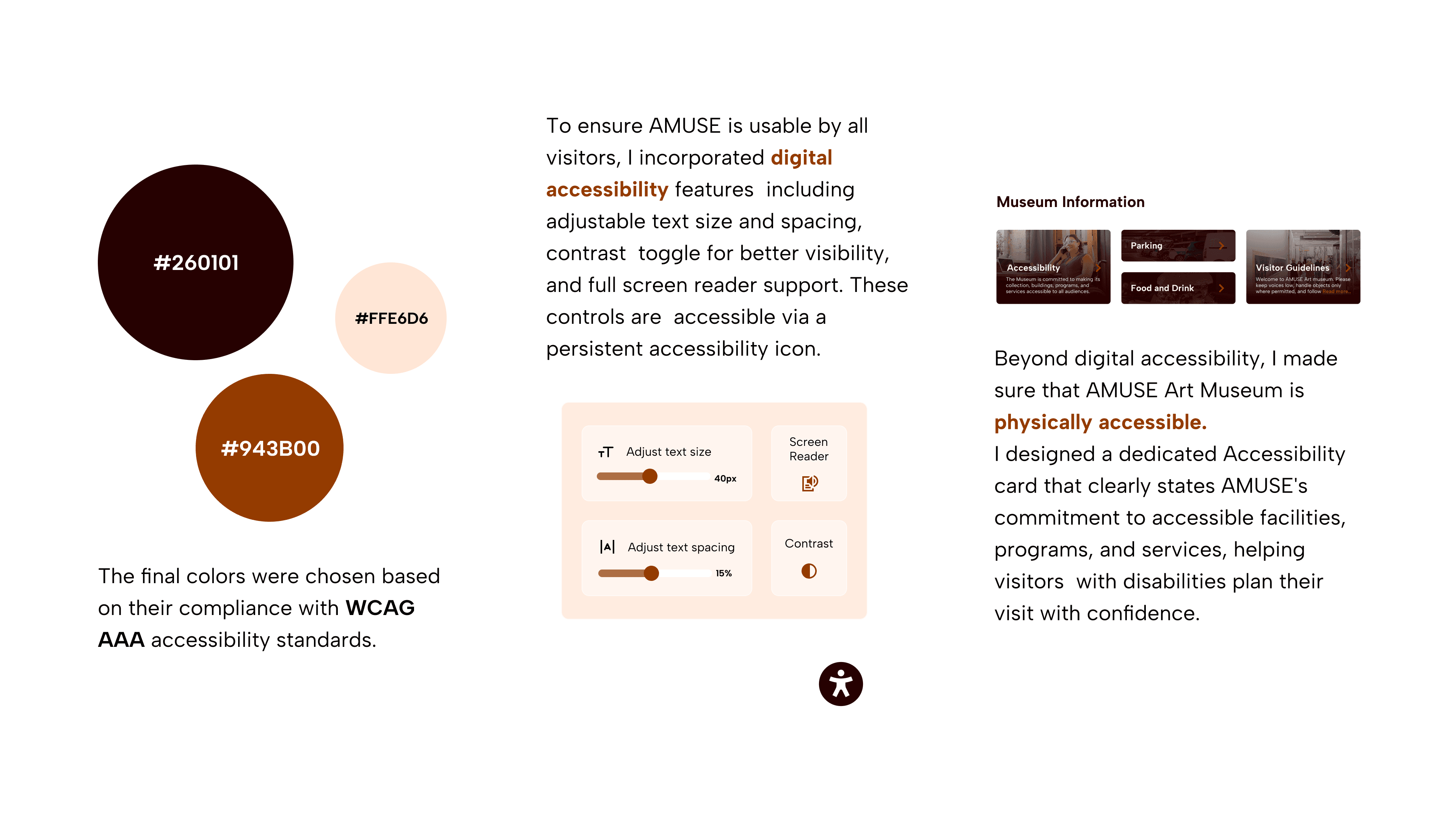
Accessibility Considerations
Accessibility Considerations
Post-Launch: Data-Driven Iteration
Post-Launch: Data-Driven Iteration
CTA Optimization
Current: "Plan a Visit" prioritizes visitor information but may create friction for informed visitors.
Test: "Plan a Visit" vs. "Buy Tickets" Measure: Completion rate by traffic source
Goal: Determine if contextual CTAs improve conversion while maintaining informed decision-making.
Art Journal Affordances
Usability tests validated strong interest in the journal feature. Post-launch, track adoption and completion rates to ensure enthusiasm translates to usage.
If engagement falls short, iterate on discoverability and flow simplification.
Mobile Version: Events
Track event bookings by entry point (Home vs. Explore). If a majority of bookings originate from Explore, rename to "Events" on mobile and restructure as primary event discovery page, aligning navigation with actual user behavior.
Key Takeaways
Key Takeaways
Impact
At the start of the project, my goal was to design for both user experience and client experience.
For users, I designed an intuitive platform that simplifies discovery and booking while solving core pain points; complete information, M-Pesa payments, and mobile-first design. The myMuseum journal feature deepens engagement by helping visitors capture and reflect on their experiences.
For the client, I designed a cost-effective PWA that works across devices, has low-cost maintenance through a single codebase, and scales efficiently across multiple locations.
<3 mins
Time it takes to book tickets. Reduced from hours to minutes
90%
Mobile money reach through M-Pesa integration.
Retention
Through art journaling
Lessons
Design is continuously iterative. Pivoting from the "digital wall of art" idea taught me to drop ideas that don't serve users, even after investing time in them.
User research is crucial. Integrating M-Pesa payments reminded me that user needs are contextual and localized, not universal.
Test more ideas and validate assumptions. The users’ enthusiasm for myMuseum feature proved that new ideas are worth experimenting through usability studies.
Next Steps
Next Steps
Feedback
Connect with senior designers on LinkedIn to critique and refine the design, particularly around mobile-first design for complex, emerging markets.
Code Interaction States
Use my front-end development (HTML, CSS, and JavaScript to design some of the interaction states. Utilize my front-end development skills in HTML, CSS, and JavaScript to design various interaction states.
Finish my LinkedIn article
I write on LinkedIn under KESHO, Embracing Futurism newsletter. This project inspired two KESHO newsletter editions exploring design's role in shaping meaning:
"Meaning and Purpose in the Age of AI and Automation" (published)
"Existential Product Design" (in progress)